Transaction Signing Hygiene: Verify, Simulate and Revoke Approvals
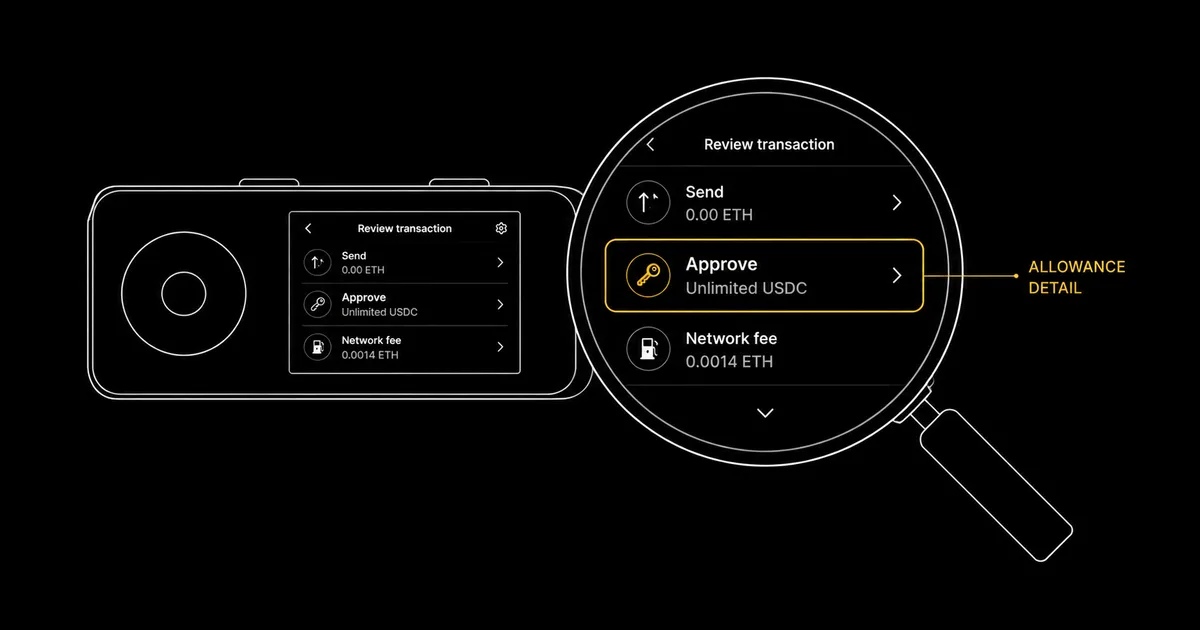
Signing hygiene is understanding exactly what a transaction does before you approve it, and clearing the permissions you no longer use. Three habits prevent most approval-phishing drains: read what the signature actually grants, simulate it to see the real asset changes before you confirm, and verify the destination and contract on the hardware screen rather than the website. This guide is for the single user managing their own keys — the mechanics and the tooling, not the multi-party signing policy that multisig adds.
Introduction
A drainer never breaks the cryptography. It does not guess your seed phrase or pull the private key out of a hardware wallet. It wins at the single moment a human looks at a signing prompt and clicks confirm without understanding what that signature grants. That moment is where the largest self-custody losses of the past two years actually happened, and it is the moment this guide is about. The mechanism is almost always the same: not a stolen key, but a permission the holder handed over willingly because the request looked routine. The discipline of pausing at the prompt, reading what is on offer, and refusing anything that does not match what you intended is unglamorous, and it is also the most reliable defence a self-custody holder has against approval phishing. It costs seconds per transaction and asks for no technical skill beyond the patience to read.
The reason it works is structural. A hardware wallet will faithfully sign whatever you tell it to sign, because that is its job; it cannot know that the token approval you are confirming was requested by a cloned site rather than the real one. Recognising that a message arrived from a hostile source — the lure, the urgency, the fake support account — is the recognition layer, and that belongs to a separate discipline covered in our recognising the drainer and phishing lure. This page picks up where recognition ends: you are at the signing screen, the request looks plausible, and the question is whether you can read it well enough to know if approving it is safe. Signing hygiene is one layer of a wider behaviour discipline — our crypto operational security hub sets out how it fits alongside threat modelling, backups and recovery.
Five things follow. First, a plain map of what the different signature types — approve, permit, setApprovalForAll and the rest — actually grant, because they are not interchangeable and the most dangerous ones look the most innocuous. Second, a verify-before-sign procedure you can run in under a minute on any request. Third, transaction simulation: the tools that show you the real asset movement before you commit, and the honest limits of what they can promise. Fourth, the difference between blind signing and clear signing on a hardware wallet, and why the device's screen is the trust anchor the whole routine rests on. Fifth, how to clear the standing permissions you have already granted, using the canonical revoke.cash, including the wrinkle that on-chain approvals and off-chain permits are cleared in different ways.
What You Are Actually Signing
Every wallet prompt looks similar — a request, a confirm button, a reject button — but the prompts grant wildly different powers, and the gap between a one-off transfer and a standing permission is the gap a drainer lives in. The single most useful skill in signing hygiene is reading a prompt well enough to know which of these you are being asked to approve. The table below maps the common request types to what they actually grant, ordered roughly from least to most dangerous.
| Request type | What it grants | Standing permission? |
|---|---|---|
| transfer | Moves a specific amount of a token once, to a named recipient. | No — ends when it confirms. |
| approve | Lets a named contract move your tokens up to a set allowance; the figure may be capped or unlimited. | Yes — persists until changed or revoked. |
| increaseAllowance | Raises an existing allowance for a contract by a stated amount. | Yes — adds to a standing permission. |
| Permit2 allowance | One on-chain approval to Uniswap's Permit2 contract, which then authorises apps by off-chain signature. | Yes — the on-chain allowance persists. |
| EIP-2612 permit / Permit2 signature | Off-chain, gasless signature granting a spender an allowance; it carries a nonce and a signature deadline, and under Permit2 a separate expiration. | Yes — the deadline bounds only when the signature may be submitted; the allowance it creates then stands until it expires or you revoke it. |
| signTypedData_v4 | Signs a structured EIP-712 message; the carrier for most permits and many app logins. | Depends entirely on the message content. |
| setApprovalForAll | Grants a contract control of your entire NFT collection for that contract in a single signature. | Yes — collection-wide, the most dangerous of all. |
The fake "claim airdrop" scenario
Here is how the dangerous end of that table cashes out in practice. A holder reaches a site claiming they qualify for a token airdrop — through a search advert, a reply on social media, or a cloned page. The site walks them to a "claim" button, and a signing prompt appears. It is not a transfer of any token out of the wallet, so the holder's instinct that "nothing is leaving, so this is safe" fires. What the prompt actually is, in many 2025 cases, is a Permit2 or EIP-2612 permit signature: an off-chain message granting an unfamiliar spender an allowance over a stablecoin the holder already owns.
Because it is gasless, the wallet shows no fee, and the reflexive check — real transactions cost gas, so a free one must be harmless — works precisely backwards. The signature confirms, a relayer submits it on-chain moments later, and the granted allowance is used to move the holder's stablecoin to the attacker. No transfer was ever shown to the holder, because none was needed; the permission was the whole attack.
Why setApprovalForAll deserves its own alarm
For NFTs the equivalent landmine is setApprovalForAll. A legitimate marketplace listing genuinely needs this function, because it lets the marketplace contract transfer an item when it sells — which is why holders are trained to approve it without much thought. The problem is that the permission is not item-specific. A single setApprovalForAll grants the named contract authority over every token in that collection held by the wallet, now and in future, until revoked.
A drainer dressed as a "free mint" or a "verify your NFT" step asks for exactly this, and an entire collection can leave in one approval the holder believed applied to a single item. When a signing prompt names setApprovalForAll, the only safe response is to confirm that the contract receiving the permission is one you deliberately chose to trade on, because the scope of what you are handing over is the whole collection rather than a single piece.
Reading a Permit2 signature next to a plain approve()
The two requests that cause the most confusion are a classic on-chain approve() and an off-chain Permit2 signature. They grant a similar power but present completely differently on screen. A plain approve() arrives as a transaction. The wallet shows it with a network-fee estimate, the contract you are calling, and — if you expand the data — a function named approve with two arguments. Those are the spender address that will gain the allowance, and the amount. The amount is where an unlimited request hides, as a very long number close to the maximum a token can represent. Because it is a transaction, it carries gas, and that gas line is itself a small piece of friction that gives you a moment to read before confirming. The mental checklist for an approve() is short: which contract am I granting to, and how much.
A Permit2 signature looks nothing like that, and the difference is the trap. There is no network fee. Nothing is being broadcast yet, because you are signing a typed message rather than sending a transaction. So the wallet frames it as a signature request, not a confirmation. The structured EIP-712 data it carries has more fields than a bare approve(). The ones that matter are the token being permitted, the spender allowed to pull it, the amount, the expiration that sets how long the permission lasts, and a nonce that ties the signature to a single use.
The contrast between an honest and a hostile permit is sharp once you know where to look. A legitimate Permit2 prompt from an exchange you reached yourself names that exchange's router as the spender, with an amount that matches your trade. A malicious one names a spender you have never seen. It is often paired with an amount equal to your whole balance of that token and a generous expiration. And it counts on the absent gas fee to make the whole thing feel weightless. Read a no-fee signature request with more suspicion than a transaction, not less. The missing fee is not a sign of safety. It is the reason the attack is gasless in the first place.
One more field is worth singling out, because wallets surface it inconsistently. The spender on a Permit2 permit is frequently a relayer or an app contract rather than the protocol you think you are using, and a drainer relies on you not checking it against anything. If the wallet shows the spender, read the last several characters and confirm them against the application's published contract address before signing. If the wallet truncates the message so heavily that you cannot see the spender or the amount at all, that opacity is itself a reason to decline. A permit you cannot fully read is a blind signature in all but name, and the same stop-sign logic applies as on a hardware screen.
The takeaway from this section is a habit, not a memorised list. Before approving anything, identify which row of that table the prompt belongs to. A one-off transfer is low-stakes and self-limiting. Anything that grants standing permission — an approval, a permit, a setApprovalForAll — deserves a deliberate pause, because it leaves a door open that someone can use later, and the gasless ones leave it open without the friction that would normally make you stop and think.
The Verify-Before-Sign Procedure
Knowing the signature types matters only if it turns into a routine you run every time, before the confirm button. The procedure below is the single-user version: four checks that take under a minute and catch the overwhelming majority of approval-phishing attempts. It is deliberately mechanical, because the value is in running it without exception rather than in any one clever step. Multi-party signing — where several people review and co-sign under an agreed policy — is a different discipline that belongs to multisig architecture, not to the single signer this guide addresses.
- Confirm the domain in the address bar yourself. Not the page that links to it, not the search result, not the message that sent you — the actual domain rendered in the browser's address bar. Drainers run on lookalike domains, and the address bar is the field they work hardest to get you to ignore — and a Browser-in-the-Browser attack can draw a convincing fake one inside the page, so check it in a window you opened yourself rather than one a site rendered for you. Reach services through a bookmark you saved, so the domain is correct before any prompt appears.
- Identify the signature method. Is this a transfer, an approve, a permit, a setApprovalForAll, or a raw signTypedData_v4 message? A gasless permit or a collection-wide setApprovalForAll on a site you did not deliberately navigate to is the highest-risk combination there is.
- Check the spender against a block explorer. An approval names a contract that will gain permission to move your tokens. If you do not recognise it, open the project's official documentation or a block explorer and confirm the contract address matches the application you intended to use, rather than a lookalike.
- Read the amount, and reject open-ended unlimited where you can. Many requests default to an unlimited allowance. Where the application lets you edit the figure, cap it to what the transaction actually needs; an unlimited approval to a contract that is later exploited can take everything that token holds, not just today's trade.
A worked check: the $500 swap that asks for everything
Picture a routine swap. You want to exchange $500 of a stablecoin for another token on a decentralised exchange you reached through your own bookmark. The first prompt is an approval, and reading it carefully shows two things worth pausing on. The allowance field reads unlimited rather than $500, and the spender is a router contract whose address you have not seen before. Neither is automatically an attack — a legitimate aggregator may route through a new contract, and unlimited allowances are a common default — but both are exactly the fields a malicious request manipulates.
The disciplined response is to edit the allowance down to the amount the swap needs, and to confirm the router address against the exchange's published contract list before approving. If the application does not let you cap the allowance and you cannot verify the router, the swap is not worth an open-ended permission to an unverified contract; close it and reach the exchange a different way.
The two-screen rule
The most important single habit in this procedure is treating the hardware wallet's own screen as the source of truth. The website shows you what it claims the transaction is; the device shows you what the transaction actually is, rendered from the data your wallet is about to sign. When those two disagree — the site says you are swapping $500 but the device shows an approval for an unfamiliar contract, or the site says "claim" but the device shows a transfer to an address you do not know — the device wins, every time, without exception.
A compromised or cloned website can show you anything it likes in the browser. It cannot change what your hardware wallet renders from the real transaction data. This is also why the first few interactions with any new application deserve the most patience: slow down, read both screens, and let the unfamiliar become familiar before you start approving on reflex.
In practice the two-screen check is three small comparisons, not a vague feeling that the screens "match". First, the action. Does the device name the same operation the site implied? If the page said "swap" but the device shows approve or setApprovalForAll, that is a mismatch worth stopping on. A swap should ultimately move tokens, not hand over a standing allowance you were not told about.
Second, the counterparty: the recipient on a transfer, or the spender on an approval, as rendered on the device. Read the leading and trailing characters of that address off the hardware screen and confirm they are the address you intended. Addresses are most often spoofed in the middle, so checking only the first four characters is not enough. Third, the amount. The figure on the device should be the figure you agreed to on the site. An allowance that reads as an enormous number when you expected a small capped one is the most common tell that a routine-looking approval is not routine at all.
Two failure modes make this check easier to skip than it should be. The first is a hurried clone that renders a convincing swap interface in the browser while the underlying transaction is an approval. Here the website and the device genuinely say different things, and only the device is telling the truth. The second is fatigue. After a dozen uneventful confirmations, the temptation is to clear the device prompt without reading it, which is exactly the moment a drainer is built to exploit. The defence against both is the same, and it is boring on purpose. Read the three fields on the device every time, including the times you are sure it is fine. The one prompt you wave through without reading is the one that was worth reading.
Transaction Simulation: Seeing the Result Before You Sign
Reading a signing prompt tells you what type of permission you are granting. Simulation goes one step further: it runs the transaction against the current state of the chain and reports the asset changes it would actually cause, before you sign anything. Instead of inferring intent from a contract name and an allowance figure, you see the net effect in plain terms — what leaves your wallet, what arrives, and whether those two match what you expected to happen. For a holder who is not going to read raw calldata, a simulation is the closest thing to a translation of the transaction into its real-world result.
Wallet-native simulation
The lowest-friction option needs no extra install. MetaMask's built-in transaction security simulates many transactions and shows estimated balance changes directly in the confirmation window, and flags requests it judges to be malicious before you confirm. Because it ships inside the wallet, the protection is on by default for supported networks, which removes the single biggest weakness of any optional tool — that people forget to use it. The credit belongs to the wallet's own built-in security here; it is the most accessible form of simulation precisely because there is nothing to remember to turn on.
Dedicated simulation tools
For a second opinion, or for wallets without native simulation, a dedicated extension fills the gap. Pocket Universe, acquired by the security firm Kerberus in August 2025, is a live option: it intercepts the signing prompt, runs the simulation, and previews the result in plain language across Chrome, Brave and Firefox, covering Ethereum and other EVM chains alongside Solana. It is one of the established extensions in this category; Pocket Universe itself reports, as of 2026, protecting over $1 billion in assets across more than 200,000 users, a vendor self-reported figure rather than an independently audited one. A standalone tool that some readers may remember, Wallet Guard, shut down as an independent extension on 31 March 2025 after its technology was folded into MetaMask; it should not be installed as a live product, and any site offering it as a fresh download in 2026 should be treated with suspicion.
Reading a simulation result
The point of a simulation is the line that summarises what changes. A legitimate swap of $500 for another token simulates cleanly: the stablecoin leaves, the expected token arrives, and the figures are roughly what you intended. A drainer simulates very differently, and learning to read the difference is the skill. The result that should end the interaction is the one that, stripped of jargon, says you send one NFT and receive zero ETH in return — assets leaving your wallet with nothing of value coming back. Any simulation that shows your tokens or NFTs moving out while the incoming column is empty, or shows an approval to a spender you cannot place, is the moment to reject and walk away. The simulation has done its job by making an invisible drain visible before it happened.
The honest limits
Simulation is advisory, not a guarantee, and treating it as infallible is its own risk. A simulation runs against the chain state at the moment you request it, so a contract whose behaviour depends on time, on a price, or on some other external condition can simulate one way and execute another. Sophisticated malicious contracts are written specifically to behave differently under simulation than in a live transaction. A clean simulation makes a transaction more likely to be safe; it does not make it certain. The right place for simulation in the routine is as one check amongst several — alongside reading the signature type, verifying the spender, and confirming the device screen — rather than as a single tool you lean on instead of the rest.
It helps to be concrete about how a simulation can mislead, because the failure is not random. It is engineered. A contract can read the difference between a simulated call and a real one from several signals: the block timestamp, the transaction's position in a block, whether certain external prices fall inside an expected band, or simply a flag the deployer flips after enough people have previewed a clean result. A drainer using this trick shows you the harmless outcome you hoped for in the preview — a token arriving, a mint completing — and only diverts assets when the call lands for real.
The lesson is not to abandon simulation but to keep its verdict in proportion. A bad simulation is close to conclusive. If the preview already shows your assets leaving for nothing, you have your answer and you stop. A clean simulation is encouraging but not absolving, which is why it sits inside the routine rather than replacing it.
There are also ordinary, non-malicious reasons a simulation and an execution diverge, and knowing them stops you from distrusting a tool that is working correctly. Slippage on a volatile pair means the exact amount you receive can differ from the preview by the tolerance you set. A second transaction landing in the same block can change a price your swap depended on. A permit whose deadline lapses between preview and signing will simply fail rather than execute. None of these is an attack. Each is a reason the figure you saw is an estimate rather than a promise. That is the right way to read every simulation: a well-informed forecast of the result, checked against your own reading of the request rather than trusted in place of it.
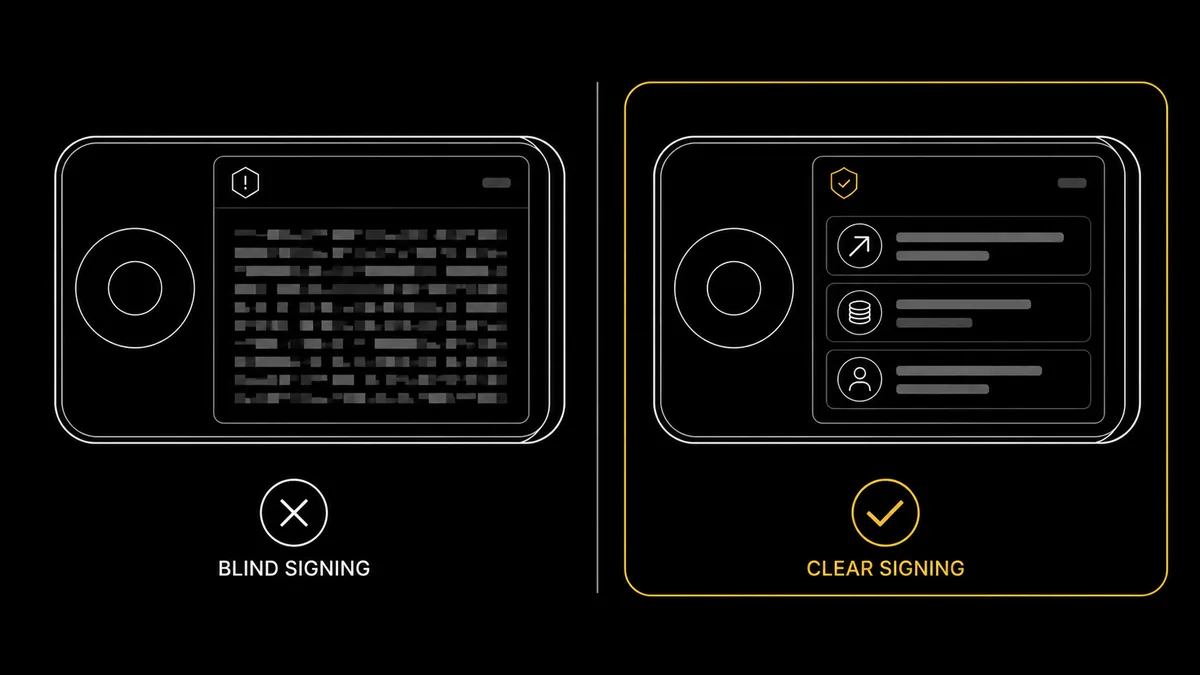
Blind Signing Versus Clear Signing on Hardware
Everything in the verify-before-sign routine ultimately rests on one assumption: that the hardware wallet can tell you what you are about to approve. When it can, the device is the trust anchor that defeats a lying website. When it cannot, that anchor is gone, and you are back to trusting the very interface a drainer controls. The difference between those two states has a name — clear signing versus blind signing — and understanding it is what makes a hardware wallet a security tool rather than an expensive rubber stamp. This is also the point where the device layer and the behaviour layer meet, so it is worth reading alongside the full device treatment in our hardware wallet security and clear-signing capability, which covers device selection and the secure-element generations that support it.
What each one means
Clear signing means the hardware wallet renders the transaction in human-readable form on its own screen: the function being called, the amount, the token, and the recipient or spender, in plain terms you can check against your intention. Blind signing means the device can only show an opaque hash or a block of raw data — a string of characters that confirms a transaction exists but tells you nothing about what it does. With a clear-signed transaction you can catch a mismatch between the website and the reality; with a blind-signed one you cannot, because there is nothing legible to check. You are trusting that the website assembled an honest transaction, which is precisely the trust a drainer is built to abuse.
Why hardware wallets warn against it
The device's entire reason for existing is to be a screen you check before you confirm — a second, trusted display that a remote attacker cannot alter. A blind signature throws that away. The holder is no longer verifying the transaction on the device; they are approving a hash on faith and hoping the interface that produced it was honest. This is why current hardware wallets surface explicit blind-signing warnings, and why the right mental model is a stop sign rather than a yellow light. If the device cannot tell you in plain terms what you are about to approve, the default is to decline. The legitimate cases where blind signing was once unavoidable — complex contract interactions the device could not yet decode — are exactly the cases drainers hid inside, which is why the industry has spent years working to shrink them.
Clear signing is getting better: ERC-7730 and EIP-712
The structural fix for blind signing is to give devices the information they need to render any transaction in plain language. EIP-712 was the early step, defining a standard for structured, typed data so that a signing request could carry a human-meaningful description rather than an undifferentiated blob. Building on it, ERC-7730 defines a machine-readable format that describes exactly what a smart contract's function calls and EIP-712 messages mean in plain text, so a hardware wallet can render them clearly. The standard was originally proposed by Ledger and is now developed under the Ethereum Foundation's Trillion Dollar Security Initiative, with Ledger's Clear Signing effort amongst its visible implementations.
This is ongoing work rather than a finished switch with a fixed date: coverage expands as more contracts publish the metadata that lets devices decode them, and the practical implication for a holder is simple. As clear signing reaches more applications, fewer transactions will need to be blind-signed at all — and until a given transaction is covered, an opaque prompt is still a reason to stop.
A worked case: the "free mint" that empties the collection
Consider a holder reaching a site advertising a free NFT mint. The mint button produces a signing request, and the hardware wallet can only show it as a hash — a blind-signing prompt — because the site's contract is not one the device can decode in plain terms. A holder running on reflex approves, treating "free mint" as low-stakes. What the opaque transaction actually contained was a setApprovalForAll granting the site's contract authority over an entire NFT collection the wallet held, and within minutes the valuable items in that collection were transferred out.
Had the prompt been clear-signed, the device would have shown setApprovalForAll and the unfamiliar contract, and the mismatch with "free mint" would have been obvious. Because it was blind, there was nothing to read, and the device dutifully signed a hash the holder could not interpret. The lesson is the rule restated: a blind-signing prompt on a transaction you cannot otherwise verify is a stop sign, and the device screen is the trust anchor only when it can actually tell you what it is signing.
Revoking Approvals with revoke.cash
Good signing hygiene going forward does not undo the permissions you have already granted. Most active holders accumulate a long tail of standing approvals over months of decentralised-application use — many of them unlimited, most of them long forgotten — and each one is a door that stays open until you close it. Revoking is the maintenance side of signing hygiene: periodically reviewing what you have approved and clearing what you no longer use, so a contract you interacted with once cannot drain you years later if it is compromised. The canonical tool for this is revoke.cash, and the procedure is straightforward once the one genuinely tricky distinction — on-chain approvals versus off-chain permits — is clear.
The revoke procedure
- Reach the canonical site through your own bookmark. Phishing clones with lookalike domains exist, so confirm the address bar reads revoke.cash before doing anything. The tool is built and maintained by Rosco Kalis with a small team, and covers over 100 networks.
- Paste your public address to inspect, no connection required. You can type or paste your wallet address — or an ENS name — into the search bar to list your allowances. Inspecting this way reads your public address only and never touches your private keys.
- Sort by value at risk. Order the list so the largest exposures surface first. An unlimited approval over a token you hold a lot of is a bigger priority than a small allowance over a token you barely own.
- Revoke what you no longer use, especially the unlimited ones. Each revocation is an on-chain transaction you sign in your own wallet, so your keys are only involved at the moment you actually revoke, not when you inspect. Batching several revocations into one session keeps the gas cost manageable.
A worked clean-up session
The procedure is easier to internalise as a single session run from start to finish. You open the canonical revoke.cash from your own bookmark, confirm the address bar reads revoke.cash with nothing appended, and paste your public address into the search box. Nothing has connected to anything yet — you are reading public chain data, so no signature and no wallet connection has been required to get this far. The page returns a list of every standing allowance that address holds, across the networks it covers, and the first useful move is to sort that list by value at risk so the allowances that could cost you the most sit at the top.
Reading down that sorted list, a few entries usually stand out. An unlimited approval to a decentralised exchange you used once last year is a clear candidate. The permission is broad, the relationship is dormant, and nothing is lost by closing it, because you can always re-approve when you next trade there. A large allowance to a protocol you genuinely use every week is a judgement call rather than an automatic revoke. You might cap it lower instead, trading a little convenience for a smaller blast radius. A tiny allowance over a token you barely hold can sit at the bottom of the queue, because the value it exposes is small. Working top-down sends your scarce attention to the exposures that matter, and the long tail of trivial allowances does not distract from them.
When you decide to revoke an entry, you click revoke on that allowance and your wallet asks you to sign. This is the first and only moment in the whole session that touches your keys. The revocation is itself an on-chain transaction that sets the allowance back to zero, so it costs gas like any other transaction. The same verify-before-sign discipline applies to it: confirm on the device that you are revoking the allowance you intended. Each revocation is a separate transaction with its own fee. So the efficient pattern is to queue several in one sitting while gas is reasonable, rather than revoking one at a time across many days. That keeps the total cost down, and it means the clean-up actually gets finished instead of left half-done.
The Permit2 wrinkle: on-chain versus off-chain
The one place revoking gets subtle is the Uniswap Permit2 system, because it splits into two parts that are cleared in two different ways. The first part is an on-chain allowance you granted to the Permit2 contract itself; that is a standard stored approval, and you revoke it on-chain at revoke.cash exactly like any other allowance, which lists Permit2 allowances alongside conventional ones. The second part is the off-chain permit signatures issued against that allowance — gasless messages that carry a deadline and a nonce.
These were never broadcast, so there is no stored allowance to set back to zero — but that does not make them untouchable. Each one carries a nonce, and that nonce is on-chain state you control: calling invalidateNonces on Permit2 for the token and spender in question advances it and voids every outstanding signature beneath it, while lockdown clears a batch of Permit2 allowances in a single transaction. An ERC-2612 permit is cleared the same way, by spending the owner nonce it was signed against. The catch is that it is a race — a scammer will usually try to redeem the signature within minutes — so treat invalidation as a real but time-critical move rather than a guaranteed undo. Left alone, an unredeemed permit does also expire on its own once its deadline passes.
The practical consequence is that the defence against a malicious off-chain permit is still mostly upstream, at the signing prompt: refusing to sign a permit you do not recognise is far more reliable than cleaning up after one. But if you have already signed, do not assume it is out of your hands — invalidating the nonce is a genuine option, and revoke.cash exposes it on the Signatures tab of your account page. Move quickly, because you are racing the scammer to the chain. For the on-chain side, periodic revocation is exactly the right tool.
What revoking does and does not do
Revoking is precise about its job. It removes a standing permission so that a spender can no longer move the tokens that allowance covered — which directly defuses the dormant-approval risk, where a contract you forgot about is later exploited and used to drain a token you still hold. It does not recover funds already taken, it does not reverse a transaction that has confirmed, and it is not a substitute for the front-line discipline of verifying before you sign. Think of it as closing doors you left open, while the verify-before-sign routine is about not opening dangerous ones in the first place. The two together — careful approval going forward, periodic revocation looking back — are what keep the standing-permission attack surface small over the years you hold the assets.
Address poisoning is a related trap worth a single line here, because it pushes in the same direction: an attacker can seed a lookalike address into your transaction history, so the recipient you verify on the device screen matters as much as the permission you grant. The full recognition mechanics of that attack — and the verify-the-full-address habit that defeats it — sit with the phishing-defence material linked elsewhere on this page, but the signing-side lesson is the same one the two-screen rule already taught: read the whole recipient address off the device, middle characters included, not just the first and last few.
The One Signature You Probably Cannot Revoke: EIP-7702 Delegation
Everything above assumes the worst a signature can do is hand someone a spending allowance you can later withdraw. Since the Pectra upgrade in May 2025 that assumption has a hole in it, and it is the most important addition to this guide. EIP-7702 lets an ordinary wallet address point at contract code, so that your address behaves like a smart account for as long as the delegation stands. The mechanism is legitimate and useful — it is how batched transactions, gas sponsorship and spending limits arrive for normal wallets — but the thing that switches it on is a signature, not a transaction.
What you are signing is an authorisation naming a contract address. It grants no allowance, moves no tokens and, on its own, will not show up in a token-approval checker. If you sign the wrong one, the contract you named runs at your address: it can move anything that arrives, and it can do so in the same block the funds land, before you see them. Nothing in the prompt looks like spending money, which is the same trap as a Permit — one level deeper.
Two things about the scale are worth stating carefully, because the reporting on this has been sloppy. Wintermute's research found that more than 97 per cent of early mainnet delegations pointed at copies of the same sweeper bytecode, which they published under the name CrimeEnjoyor. That is a real and striking number, but it is not 97 per cent of users being robbed: those sweepers sit mostly on addresses whose keys were already compromised, automatically taking any ETH that arrives. Wintermute itself pushed back on the headlines, and the position is worth repeating — EIP-7702 is not flawed and is safe to use. The risk is the phishing route: being talked into signing an authorisation you did not intend.
The defence differs from everything else in this section, and this is the part to remember. A token approval can be revoked, and the previous pages of this guide tell you how. A delegation usually cannot, at least not the way you would expect: the standard allows clearing it by delegating to the zero address, but most mainstream wallets do not expose that option, and if a sweeper is live at your address it will take the gas you send to do it. You can check whether an address carries a delegation with a public tool such as eip7702.app.
If it carries one you did not set, treat the address as burned. Move whatever you can still move to a wallet created from a fresh seed, rather than trying to clean the old one. That is the opposite of the revoke-and-continue advice that works for approvals, and the difference is worth internalising before you meet it.
Conclusion
Signing hygiene comes down to three habits and a piece of maintenance. Read what a signature actually grants, so you can tell a one-off transfer from a standing permission and treat a gasless permit or a collection-wide setApprovalForAll with the suspicion it deserves. Simulate the transaction where you can, so the real asset movement is visible before you commit and a drain that shows assets leaving with nothing coming back gets caught while it is still preventable. Verify on the hardware screen, treating the device as the source of truth whenever it disagrees with the website, and treating a blind-signing prompt you cannot otherwise check as a stop sign rather than a yellow light. Then, periodically, clear the standing permissions you no longer use at the canonical revoke.cash, closing the doors that years of decentralised-application use leave open.
None of this requires technical expertise, and none of it takes long once it becomes routine. The single-user holder who pauses at every prompt, runs the four verify-before-sign checks, leans on simulation as one signal amongst several, and revokes on a regular rhythm has closed the door through which almost every large approval-phishing loss of the past two years actually walked. The hardware did its job in every one of those cases; it signed exactly what it was told. The difference between the holders who lost and the holders who did not was whether they read the request before they confirmed it. That habit is the whole of signing hygiene, and it is entirely within a single person's control.
One practical prerequisite underpins the verify-on-the-device habit: it only works if the device can actually render a transaction in plain terms. A clear-signing-capable hardware wallet — such as a Ledger device, whose Clear Signing work originated the ERC-7730 format discussed above — is what turns the screen into a trust anchor rather than a rubber stamp. The habit and the hardware are two halves of the same defence: a device that can show you what you are signing, and a person who reads it before confirming.
Sources
- revoke.cash — token-approval revocation tool (canonical): backs the over-100-networks coverage, the public-address inspection that never touches keys, and sorting allowances by value at risk before revoking.
- Pocket Universe — transaction-simulation extension: backs the live-tool status, the pre-signing simulation across Chrome, Brave and Firefox on EVM chains and Solana, and the vendor's own self-reported user and assets-protected figures.
- Kerberus — Pocket Universe acquisition: backs the August 2025 acquisition of Pocket Universe by Kerberus and the tool's continued operation under that owner.
- MetaMask Support — built-in transaction security: documentation for the no-install transaction-security alerts that simulate balance changes and flag malicious signatures inside the wallet.
- ERC-7730 — Structured Data Clear Signing Format: backs the machine-readable clear-signing format, its EIP-712 support, and its development under the Ethereum Foundation's Trillion Dollar Security Initiative.
- Ledger Developer Portal — Clear Signing and ERC-7730: backs the clear-versus-blind signing distinction and Ledger's role originating and implementing the ERC-7730 clear-signing standard.
- Uniswap Permit2 — token-approval mechanism: backs the on-chain Permit2 allowance versus off-chain permit distinction, the deadline-and-nonce expiry of off-chain permits, and the gasless signature model.
Frequently Asked Questions
- What is the difference between an approval, a permit and a transfer?
- A transfer moves a specific amount of a token once, from you to a named recipient, and grants no standing permission. An approval grants another contract permission to move your tokens on your behalf up to a set allowance, which persists until you change or revoke it; the danger is that many requests default to an unlimited allowance. A permit, in the EIP-2612 and Uniswap Permit2 families, is an off-chain, gasless signature that grants the same kind of allowance without an on-chain transaction, so it pays no gas and feels like nothing happened. The key distinction is standing permission: a transfer ends when it confirms, while an approval or a permit leaves a door open that an attacker can walk through later. The setApprovalForAll function is the most dangerous of all, because it grants control of an entire NFT collection in one signature.
- How do I simulate a transaction before signing it?
- Simulation runs a transaction against current chain state and reports the asset changes it would actually cause before you sign. The simplest option is wallet-native: MetaMask's built-in transaction security shows estimated balance changes and flags requests it judges malicious, with no extra install. A dedicated extension such as Pocket Universe, now owned by Kerberus, intercepts the signing prompt and previews the result in plain language. What you are reading is the net effect: a legitimate swap shows the token going out and the expected token coming back, while a drainer shows assets leaving and nothing of value returning. The result to walk away from is one that reads, in effect, you send one NFT and receive zero ETH in return. Simulation is advisory, not a guarantee, because contracts whose behaviour depends on time or external state can simulate differently from how they execute.
- Is revoke.cash safe, and does it touch my private keys?
- The canonical revoke.cash at https://revoke.cash is the established tool for managing token approvals, built and maintained by Rosco Kalis with a small team, and covering over 100 networks. To inspect your allowances it reads your public address only, which you can paste in without connecting anything, so listing what you have approved never touches your private keys. Keys are only involved when you actually revoke something, because a revocation is an on-chain transaction you sign yourself in your own wallet, exactly like any other. The real risk is not the tool but its imitators: phishing clones with lookalike domain names exist, so reach it through a bookmark you saved yourself rather than a search advert, and confirm the address bar reads revoke.cash before connecting a wallet.
- What is blind signing, and why are hardware wallets warned about it?
- Blind signing is approving a transaction your hardware wallet can only show as an opaque hash or raw data, rather than a human-readable summary of what it does. Clear signing is the opposite: the device renders the actual call, amounts and recipient on its own screen so you can verify them. Hardware wallets warn about blind signing because the device's whole purpose is to be a trusted screen you check before confirming, and a blind signature removes exactly that protection. You are trusting that the website built an honest transaction, which is the assumption a drainer exploits. Treat a blind-signing prompt as a stop sign: if the device cannot tell you what you are about to approve in plain terms, the safe answer is to decline until it can.
- How do I revoke a Permit2 approval versus an on-chain approval?
- They live in different places, so they are cleared differently. A standard on-chain approval is a stored allowance on the token contract, and revoking it means sending a transaction that sets that allowance back to zero, which you can do at revoke.cash. The Permit2 system has two parts: an on-chain allowance you granted to the Permit2 contract, which is revoked on-chain in the same way, and the off-chain permit signatures issued against it, which carry a deadline and a nonce and expire on their own once the deadline passes. An unexpired off-chain permit CAN still be cancelled: it is signed against a nonce, and invalidating that nonce on-chain voids it. revoke.cash exposes this on its Signatures tab. It is a race against the scammer rather than a guaranteed undo, so the first defence remains refusing to sign one you do not recognise in the first place. revoke.cash lists both your standard allowances and your Permit2 allowances so you can see and reset the on-chain side.
- How often should I revoke token approvals?
- A sensible rhythm is a review every few months, plus an immediate check after any session with a new or unfamiliar contract. Every decentralised-application interaction can leave a standing allowance behind, and many default to unlimited and persist indefinitely until you revoke them, so the list of open permissions grows quietly over time. The danger is the dormant unlimited approval to a contract that is later exploited, which can drain those tokens long after you forgot the approval existed. List your active allowances at the canonical revoke.cash, sort by value at risk so the largest exposures surface first, and revoke anything you no longer actively use. Each revocation is its own on-chain transaction that costs gas, so batching the clean-up into one session keeps the cost down.
- Does granting a limited approval instead of unlimited keep me safe?
- A limited approval is safer than an unlimited one, but it is not the same as safe. Capping the allowance to the amount a transaction actually needs means a contract that is later exploited can only ever take that capped figure rather than your whole balance, which contains the damage from the dormant-approval scenario. What a limited approval does not protect against is approving a malicious spender in the first place: if you grant even a small allowance to an attacker's contract for a token you hold a small amount of, that amount is still at risk, and a drainer can ask for exactly the balance it sees. Limiting the amount reduces blast radius; verifying who you are approving and on what contract is what prevents the approval being malicious at all. Use both, and treat the limit as damage control rather than a substitute for reading the request.
← Back to Crypto Investing Blog Index
Financial Disclaimer
This content is not financial advice. All information provided is for educational purposes only. Cryptocurrency investments carry significant investment risk, and past performance does not guarantee future results. Always do your own research and consult a qualified financial advisor before making investment decisions.