Mobile Wallet Security: A Hot-Wallet Hygiene Guide
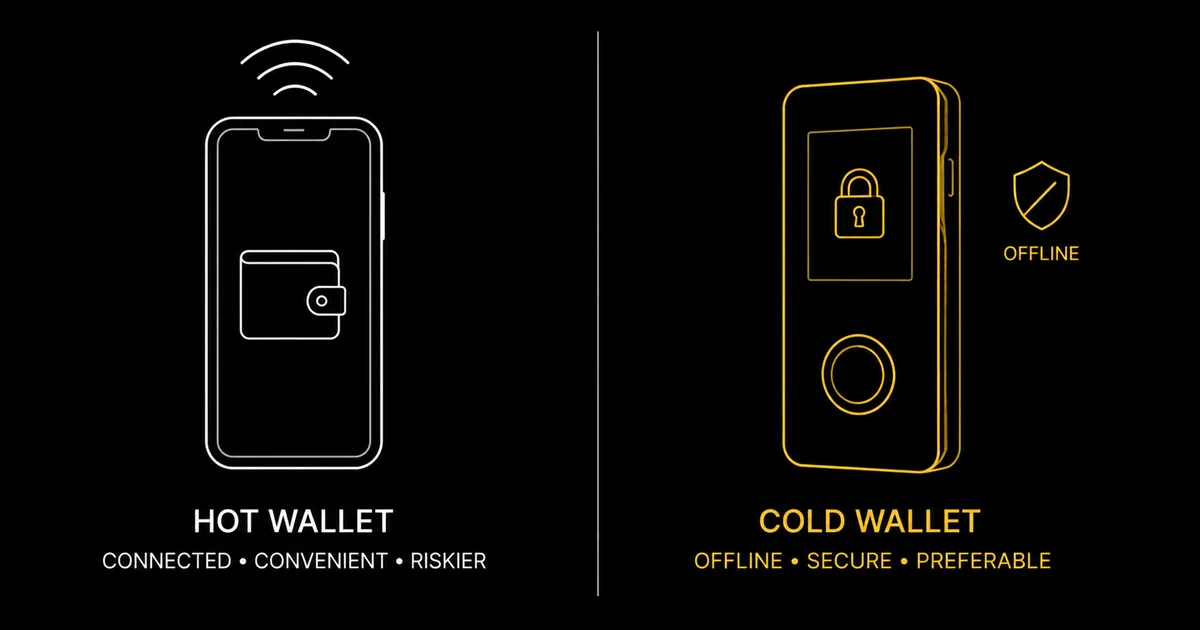
A mobile wallet is a hot wallet — the keys sit on an internet-connected phone — so it should be treated as a spending account, not a vault. Keep only small operational amounts on the phone and graduate the bulk to hardware cold storage. Four mobile threats actually drain funds: SIM-swap interception of SMS codes, clipboard-hijack address swaps, fake apps, and a stolen unlocked phone. This guide covers the hygiene that closes each one, where the phone's own security genuinely helps, and when to move the savings tier off the device entirely.
Introduction
A crypto wallet on a phone is the most convenient way to hold and spend digital assets, and that convenience is exactly what makes it the riskiest place to keep serious money. The reason is structural rather than a flaw in any particular app: a mobile wallet keeps the private key on a device that is connected to the internet all day, runs dozens of other apps, receives links and messages constantly, and travels everywhere in a pocket. That is the definition of a hot wallet, and it sets a hard ceiling on how much it is prudent to store there, no matter how well the wallet is built or how carefully the phone is locked down.
This guide is deliberately narrow. It is not a treatise on device hardening or a tour of every cryptographic primitive a wallet uses; it is about the daily hygiene that decides whether a phone wallet survives contact with the real threats people meet in 2026. Those threats are remarkably consistent and almost entirely operational. A SIM-swap moves the phone number to an attacker who then resets accounts and intercepts SMS codes. Clipboard malware silently swaps a pasted address for the attacker's. A convincing fake app, installed from outside the official store or impersonating a real one inside it, harvests the seed phrase on first run. And the oldest threat of all, a phone stolen while unlocked, hands a thief whatever the open wallet will let them send.
The single organising idea is the split between hot and cold. Mobile wallets belong to the hot tier, holding a small operational float for spending and day-to-day decentralised-application use, while the savings tier lives on hardware cold storage where the key never touches a networked machine. That separation is part of the wider operational-security picture set out in our crypto operational security complete guide, which frames the layered stack this page sits inside. Everything that follows assumes that split as the baseline and shows how to keep the hot tier hygienic without pretending it can ever be a vault.
What follows works through the phone wallet from the inside out. First, why the hot-wallet label is not a slogan but a constraint that should govern how much you store. Then the four threats that account for almost every mobile drain, and the defence for each, with SIM-swap and app-store risk getting their own sections because they are the two most commonly underestimated. After that, an honest account of what the phone's own security hardware does and, just as importantly, does not protect against, followed by the small daily habits that close the remaining gaps. The guide ends where the money should: with the trigger points and the practical steps for graduating savings to a hardware device.
Why a Mobile Wallet Is a Hot Wallet
The terms hot and cold describe one thing only: whether the private key is exposed to an internet connection. A hot wallet holds its key on a device that is online, which makes signing instant and convenient but means malware, a malicious website, or a compromised app could in principle reach the key or trick the holder into using it. A cold wallet holds its key on a device that is offline by design, signing transactions in isolation and exposing only the signed result to the networked world. A mobile wallet is unambiguously hot. The key is generated on the phone, stored on the phone, and used on the phone, and the phone is the single most connected, most exposed computer most people own.
That label is not a verdict against mobile wallets; it is a constraint on what they are for. A hot wallet is a current account. It is the right tool for holding a small balance you spend, swap, or use to interact with decentralised applications, where the convenience of signing in seconds outweighs the modest sum at risk. It is the wrong tool for a portfolio, in the same way a current account is the wrong place to keep a house deposit. The mistake that turns a manageable hot wallet into a disaster is not using one; it is forgetting it is hot and letting the balance creep up until the phone is quietly holding savings-tier money.
The spending tier versus the savings tier
The practical model is a two-tier split, and the table below makes the boundary concrete. The figures are inflection points rather than rules, and the right line depends on income and how actively the phone is used, but the principle holds at every size: the hot tier carries only what its convenience justifies risking.
- Spending tier — the phone. A small float, for most people under a few hundred dollars and at most a low four-figure sum for an active trader, held on a reputable non-custodial mobile wallet. The realistic threats are automated: phishing links, clipboard malware, a fake app. The defence is recognition habits and not storing more than the loss would be a bad afternoon rather than a bad year.
- Savings tier — hardware cold storage. Everything above the spending float, held on a hardware device where the key is generated and kept offline and every transaction is confirmed on the device's own screen. The phone can still be the interface, pairing with the device to build and broadcast transactions, but the key never leaves the cold device.
- The bridge. A hardware wallet paired to a phone gives the convenience of the mobile interface with the security of an offline key. This is the pattern that lets a phone remain useful without holding the savings, and it is where the corridor at the end of this guide points.
A single decision rule cuts through any uncertainty about where the line sits: would losing the phone's wallet overnight, to a theft or a malware infection while you slept, genuinely hurt? If the honest answer is yes, the balance is too high, and the surplus belongs in cold storage tonight. The threats described in the next section do not negotiate over the balance; they take whatever is present the moment they succeed, so the only reliable cap on a mobile loss is the cap you set on the mobile balance.
A worked split makes the abstraction concrete. Suppose a holder owns the equivalent of $30,000 across a few tokens and uses decentralised applications a couple of times a week. The hygienic arrangement is not one wallet but two layers. A few hundred dollars sits on the phone wallet, enough to pay gas, swap small amounts and approve the contracts that day-to-day activity needs, and that float is topped up from cold storage only when it runs low, in the same way a current account is replenished from savings.
The remaining $29,000-odd never appears on the phone at all: it lives on a hardware device, and when a larger transaction genuinely needs it, the device is connected, the transaction is confirmed on the device's own screen, and it is disconnected again. In this arrangement the worst a mobile compromise can do is take the few hundred dollars on the phone, because that is the only sum the phone ever has the authority to move.
The same person holding all $30,000 in the mobile wallet for convenience would be one fake app or one clipboard swap away from losing the entire portfolio. The separation has not made any single attack less likely; it has capped the damage of every attack at the size of the float, which is the whole point of treating the phone as a spending account.
The pattern also degrades gracefully, which is what distinguishes good security architecture from a single clever trick. If the phone is lost, stolen or infected, the recovery does not depend on the phone having survived: the savings tier is reconstructed from the hardware device's own seed backup, entirely independent of anything the handset held. The mobile wallet is treated as disposable infrastructure, regenerated on a new phone from the same wallet provider whenever needed, while the irreplaceable secret — the cold-storage seed — was never within reach of the device that travels and gets stolen. Designing for the failure you expect, rather than hoping it will not happen, is the quiet difference between a holder who shrugs off a stolen phone and one for whom it is a catastrophe.
The Four Mobile Threats That Actually Drain Funds
Mobile crypto security gets discussed as if the danger were exotic, but the losses cluster around four ordinary mechanisms. Each is operational, meaning it works by exploiting a habit or an account rather than by breaking the wallet's cryptography, and each has a clean defence. The list below names the four, the mechanism behind each, and the section of this guide that closes it. The volume context matters too: the broad picture in 2026 is that signature-based phishing dwarfs raw mobile malware, with Scam Sniffer's 2025 annual report recording roughly $83.85 million drained through phishing across about 106,000 victims, so the recognition habits that defeat malicious signing requests are as important on a phone as the device-level defences below.
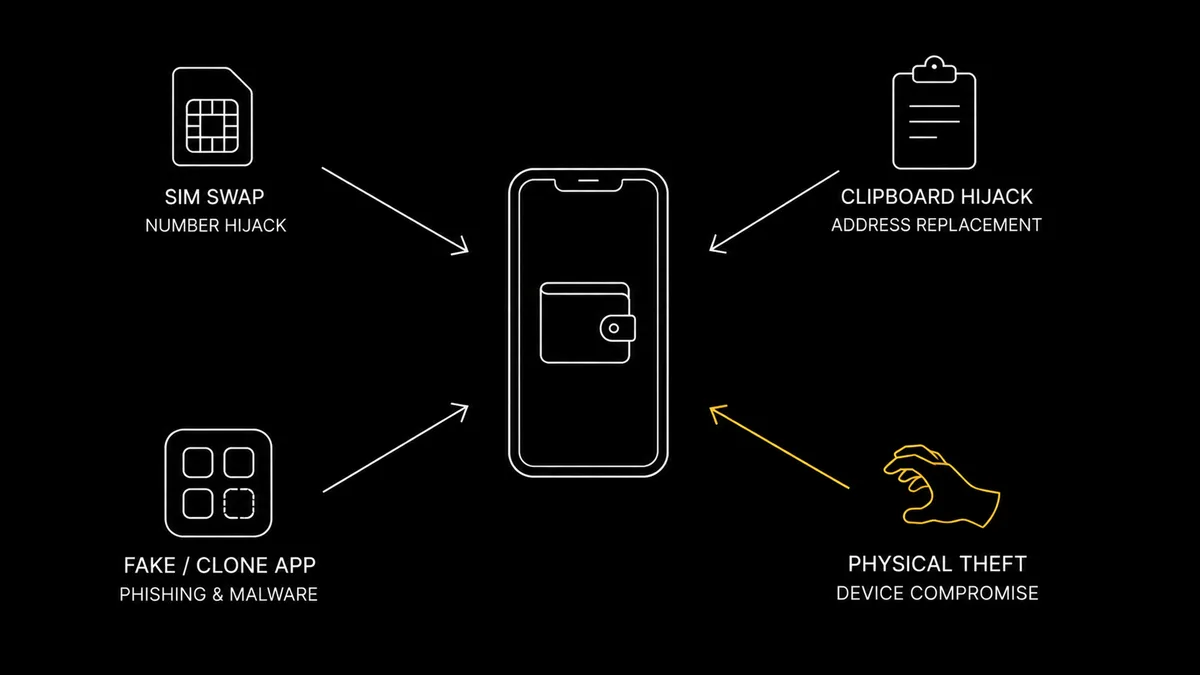
- SIM-swap. The attacker moves your phone number to a SIM they control, then intercepts SMS two-factor codes and password-reset links to take over email, exchanges and any SMS-protected wallet. The defence is to demote SMS and lock the carrier account, covered in the SIM-swap section below.
- Clipboard hijacking and address poisoning. Malware on the phone watches the clipboard and silently replaces a copied wallet address with the attacker's, or a poisoned lookalike address appears in your history. The defence is a one-line verification habit, covered under daily hygiene.
- Fake apps. A counterfeit wallet, installed from outside the official store or impersonating a real one inside it, harvests the seed phrase the moment you enter it. The defence is verified installation and a permission audit, covered in the app-store section.
- Device theft. A phone stolen while unlocked hands a thief whatever the open wallet will send. The defence is a separate app-level lock, a short auto-lock, and remote wipe, covered alongside biometrics.
Two of these deserve a specific name because the malware behind them is current rather than hypothetical. The FBI's Internet Crime Complaint Center (IC3) logged 982 SIM-swap complaints in 2024 with reported losses of $25,983,946, a figure that has actually fallen year on year as carriers tightened controls, but which still represents tens of millions taken through a single mechanism. And on Android, the Crocodilus trojan, first detailed by the mobile-security firm ThreatFabric in March 2025 and active across eight countries by mid-2025, shows how a modern fake app works: it abuses Android's accessibility service to read everything on screen, overlays fake login prompts on top of real banking and crypto apps, and is specifically engineered to capture seed phrases and one-time passcodes. It is the reason the app-store and permission advice below treats accessibility access as a red flag rather than a convenience.
The thread running through all four is that none is a failure of the wallet's encryption. The key stays mathematically safe; the value leaves through the number, the clipboard, a fake front door, or an unlocked screen. That is why the rest of this guide is about behaviour and configuration rather than cryptography, and why the recognition skills that stop a malicious signing request — set out in full in our wallet drainer and phishing recognition guide — matter just as much on mobile as the device hygiene here.
SIM-Swap Defence: Cutting the Phone-Number Root of Trust
A SIM-swap is the transfer of your phone number to a SIM card the attacker controls, achieved by social-engineering a carrier representative or, in the worst cases, bribing one. The moment the number moves, every SMS code and password-reset link that would have come to you goes to them instead. The attacker does not need your wallet's key; they reset the email account that anchors everything else, then walk through exchange logins and any wallet still protected by an SMS code. The phone wallet's own key may be untouched, but the accounts around it — where larger balances often sit — fall in sequence.
The defence has two halves, and both are needed. The first is to remove SMS as a root of trust wherever money is involved. The second is to lock the carrier account itself so the number cannot be moved without your explicit authorisation.
Demote SMS, promote app-based and hardware two-factor
SMS is the weak link because it is delivered to a phone number, and a phone number is exactly what a SIM-swap steals. An authenticator-app code or a hardware-key tap, by contrast, is generated on a device you physically hold and cannot be intercepted by moving the number.
- Switch any account that gates funds off SMS two-factor. Exchanges, email, and any wallet service offering it should use an authenticator app such as Aegis or 2FAS, or a hardware security key like a YubiKey, in place of texted codes.
- Keep SMS only where there is no alternative, and treat any account still relying on it as a soft target whose balance should stay low.
- Store the authenticator-app seeds with an offline backup so that losing the phone does not lock you out, but keep that backup off any cloud note where it could be read.
Lock the carrier account
Removing SMS protects your logins; locking the carrier protects the number itself. Since the US Federal Communications Commission's SIM-swap and port-out rules took effect in July 2024, every American wireless provider is required to offer secure authentication before transferring a number and to make an account-lock feature available, so the tools below now exist by law rather than as a courtesy.
- Set a carrier port-out PIN or passcode distinct from any other PIN you use, required before the carrier will move or re-SIM your number.
- Enable the number-lock or port-freeze feature your carrier offers, which blocks transfers outright until you lift it.
- Treat any unexpected "SIM change" or "port-out" notification as an attack in progress and contact the carrier immediately, because these notices are themselves a requirement of the 2024 rules and are often the first sign of a swap.
A worked example shows why this combination is decisive. Picture a holder with a $40,000 exchange balance and a small mobile wallet, all two-factor still on SMS. An attacker swaps the number at 2am, resets the exchange password by SMS, drains the account, and is gone before the victim wakes. Now run the same attack against the hardened version: the number is locked at the carrier, so the swap fails at the first step; even if it somehow succeeded, the exchange login needs an authenticator code that lives in an app on the device, which the swapped number cannot produce. The attacker holds a worthless phone number. The point of cutting the phone-number root of trust is that it makes the whole SIM-swap chain dead-end before it reaches anything that matters.
Recognising and surviving a swap in progress
Prevention covers most cases, but a swap that does succeed announces itself, and the first minutes decide how much is saved. The telltale sign is sudden, unexplained loss of mobile service — calls failing, texts not arriving, the signal bars showing no network in a place they normally work — because once the number is ported to the attacker's SIM, the legitimate handset is cut off from the cellular network entirely. A genuine outage looks the same at first, which is exactly why the instinct to wait and see is dangerous: the safe assumption when service drops without explanation, especially if it follows a phishing message or an account-warning email, is that a swap is underway until proven otherwise.
The response is a fixed sequence run from a second device that still has connectivity, a laptop or a partner's phone, not the dead handset. First, change the password on the email account that anchors your other logins, because email is the master key an attacker walks through everything else with. Second, sign out of and lock the exchange and wallet accounts that hold value, and if the platform offers it, trigger a withdrawal freeze. Third, call the carrier from any working line and report the unauthorised port, which begins the reversal and creates the record that matters later.
Doing these in order matters: securing email first denies the attacker the reset path they need for everything downstream, so even if they hold the number for an hour, the accounts it would have unlocked are already beyond reach. The holder who has demoted SMS in advance has a far easier version of this drill, because the authenticator codes the attacker needs were never tied to the number they stole, but the sequence is worth rehearsing regardless, since the moment to learn it is not the moment the bars disappear.
App-Store Risk: Installing the Real Wallet
The fastest way to lose a mobile wallet is to install the wrong one. Counterfeit wallets reach victims two ways: as a sideloaded file or link pushed through a message, advert or fake "support" channel, and as an impostor sitting inside the official store under a near-identical name and icon. Either way the trap is the same. A fake wallet asks the holder to "import" an existing wallet by typing the seed phrase, or generates a wallet whose key the attacker already holds, and the funds move the instant the phrase is entered or the wallet is funded. The encryption never matters because the holder hands over the key voluntarily.
Verify the install
The reliable way to reach the genuine app is to start from the wallet provider's own website — found through a bookmark you saved, not a search advert — and follow its link to the store listing, rather than searching the store directly and trusting the first result.
- Start from the official site link. Reach the store page through the provider's own website, opened via a saved bookmark, so a lookalike listing never gets the first click.
- Check the developer name exactly, not the app name, which impostors copy freely. The publisher field should match the company precisely, character for character.
- Sanity-check install counts and review age. A genuine major wallet shows millions of installs and years of reviews; a fresh listing with a handful of downloads and only recent reviews is a warning sign.
- Never sideload a wallet from an APK file or an unofficial store, and never act on a message offering a "new version" or "migration" download.
Audit the permissions
A wallet needs very little from the operating system, so excessive permission requests are themselves a signal. The Crocodilus class of trojan depends entirely on permissions a real wallet has no use for, which makes a permission audit one of the cheapest defences available.
- Deny accessibility access to any wallet or unknown app. Accessibility permission lets an app read and control the whole screen, and it is the exact mechanism Crocodilus uses to capture seed phrases and codes.
- Deny screen-recording and overlay permissions to anything that does not obviously need them, since overlays are how fake login prompts are painted over real apps.
- Refuse any fresh wallet that prompts for your seed phrase on first launch without you having chosen to import; a genuine new wallet generates its own phrase and asks you to write it down, never to type one in.
The lure that delivers a fake app — the message, the advert, the fake support agent — works by the same recognition failures as any other phishing, and the full catalogue of how those approaches are dressed up is covered in the phishing-defence guide linked earlier in this article. On mobile the rule reduces to a single discipline: a wallet is something you go and fetch from a source you already trust, never something that arrives and asks to be installed.
What the Phone's Operating System Actually Protects
Modern phones include genuinely strong cryptographic hardware, and it is worth being precise about what it does, because the marketing language around it invites a dangerous misreading. On iPhone, the Secure Enclave is a dedicated coprocessor isolated from the main chip that stores and operates on cryptographic keys without exposing them to the rest of the system, and ties their use to the device passcode and biometrics. On Android, the hardware-backed Keystore performs the equivalent role, with StrongBox on supported devices placing the keys in a separate tamper-resistant security chip, and the wider trusted-execution environment isolating sensitive operations from the main operating system. These are real protections, and a reputable wallet uses them to keep its key encrypted at rest so that a casual compromise of the phone does not yield the key directly.
What that hardware does is narrow and specific: it protects the key while it is sitting on the device, against an attacker trying to extract it from storage. The boundary box below sets out the difference between what it does and does not cover, because the gap is exactly where mobile losses happen.
- The secure hardware protects: the private key at rest, kept encrypted and isolated; the binding of key use to your biometric or passcode; and the app sandbox that stops one app reading another's data. This defeats casual extraction of a key from a lost or briefly accessed phone.
- The secure hardware does not protect: you approving a malicious transaction yourself, because the hardware signs whatever you authorise; a seed phrase typed into a fake app, because the phrase leaves through the app, not the secure chip; a device that has been rooted or jailbroken, which removes the isolation the protections depend on; or a trojan with accessibility access reading the screen around the wallet.
- The boundary depends on you to hold it: the protections above only stay in force while the operating system is current and the device is unmodified, so keeping it patched and never rooting or jailbreaking it is what keeps the secure hardware doing its job. The chip cannot defend the very isolation that a deliberate jailbreak switches off.
This is why no honest description of a phone wallet calls it hack-proof, and why that phrase should be treated as a warning sign on any product that uses it. The Secure Enclave and Keystore are necessary but not sufficient: they raise the floor by making the key hard to steal at rest, while the decisions about what to sign, what to install, and what permissions to grant set the ceiling.
The two practical rules that keep the hardware doing its job are to keep the operating system updated, since these protections are patched and improved with each release, and to never root or jailbreak a device that holds a wallet, because doing so dismantles the very isolation that makes the secure hardware meaningful. Approving a transaction safely is its own discipline — reading what a signature grants before confirming — and the mechanics belong to the signing-hygiene guide rather than to the phone's hardware, which will faithfully sign whatever it is told to.
The rooting and jailbreaking point deserves to be made plainly, because it is where the most expensive misunderstanding lives. The entire security model of a modern phone rests on the operating system enforcing boundaries between apps and refusing to run code it has not verified. Rooting an Android device or jailbreaking an iPhone deliberately removes those boundaries to gain unrestricted control, and the moment they are gone, the app sandbox that stops a malicious app reading the wallet's storage stops working, the verification that keeps unsigned code off the device stops working, and the secure hardware is left guarding a key inside a house whose walls have been knocked through. A wallet on a rooted phone is not a strong wallet with one weakness; it is a hot wallet that has had its single most important protection switched off on purpose.
The same logic applies to the quieter erosions — running a wallet on an unpatched operating system years behind on security fixes, or installing apps from sources that bypass the store's review — each of which chips at the isolation the secure hardware silently depends on.
It helps to walk one concrete failure through the boundary to see exactly where the hardware stops helping. Imagine a holder who installs a convincing fake decentralised-exchange front end and connects their wallet to it. The site presents a transaction that looks like a routine token swap, but the data it actually asks the wallet to sign is an unlimited-spending approval over the holder's most valuable token. The Secure Enclave does its job perfectly: it holds the key, it requires the holder's fingerprint before signing, and it never exposes the key to the fake site.
And the funds are gone anyway, because the holder, seeing a familiar approval prompt, pressed their finger to the sensor and authorised exactly what the attacker wanted. Nothing in the hardware was defeated; the hardware faithfully executed a decision the holder made without reading it. That gap — between protecting the key and protecting the decision — is the one no chip can close, and it is why the habit of reading what a prompt actually grants, rather than approving on familiarity, matters more on a phone than any hardware feature the marketing emphasises.
Daily Hygiene: Clipboard, Screenshots, Biometrics
The defences so far are mostly one-time configuration. The last layer is the handful of small habits repeated every time the phone is used to move crypto, and they close the gaps that configuration cannot. Three matter most: how addresses are handled, how the seed is never captured, and how the wallet is locked.
The clipboard rule
Clipboard hijacking malware swaps a copied address for the attacker's in the moment between copy and paste, and a poisoned lookalike address can also surface in transaction history. The hygiene rule is one line: before sending, verify the full first and last four to six characters of the destination against the source, and prefer scanning a QR code over copy-and-paste wherever the option exists, since a scanned code is not exposed to the clipboard at all. The mechanism behind these address swaps — how a clipper works and how poisoned addresses are seeded into your history — is set out in the wallet-drainer and phishing-defence guide linked elsewhere in this article; here the rule is simply to check the ends and prefer the QR.
Never capture the seed
A seed phrase must never become a digital file on the phone. The trap that catches careful people is the screenshot: photographing the recovery words during backup feels efficient, but a screenshot is a photo, and a modern phone syncs its photo library to iCloud or Google Photos automatically, putting the recovery secret on a cloud server within seconds. The same applies to typing the phrase into a note, a message draft or a password manager. The seed belongs on paper or metal, offline, written by hand — and the broader regime for storing it safely is its own discipline, covered in the seed-backup guide rather than treated as a mobile task.
Biometric versus PIN
The lock on the wallet is the last line if the phone is taken. Biometrics and a PIN trade off differently, and the right choice depends on the balance and the threat.
- Biometric unlock (Face ID, fingerprint) is fast and resists shoulder-surfing, because nobody learns a secret by watching. Its weakness is compulsion: a face or finger can be physically or legally compelled far more easily than a memorised number.
- A strong alphanumeric PIN cannot be applied to your hand and is the stronger lock where coercion is a realistic concern or the balance is higher. Its weakness is that it can be observed as you type it, so shield it in public.
- Use both, layered. A biometric on top of a strong device passcode for convenience, with the wallet app's own lock enabled separately so that an unlocked phone alone cannot send funds.
Two smaller habits round out the daily routine. Avoid signing transactions on public Wi-Fi, using mobile data or a trusted network instead, since an untrusted network is one more variable you do not need when authorising a transfer. And set the phone's auto-lock to a short interval so a momentarily unattended device does not sit open. None of these is dramatic, but together they remove the last easy openings that the configuration steps leave behind.
When and How to Graduate to Cold Storage
Every defence in this guide raises the floor under a hot wallet, but none of them changes the fact that it is hot. At some point the balance, or the holder's appetite for risk, crosses the line where the right answer is not a better-defended phone but moving the savings off the phone entirely. The triggers are worth naming because the crossing tends to happen quietly, as a spending float gradually accumulates into a portfolio nobody decided to keep on a handset.
- The balance would hurt to lose. Once the phone wallet holds more than you would treat as spending money — for most people once it climbs into four figures and stays there — the surplus belongs in cold storage.
- You are holding rather than spending. If a balance has sat untouched for weeks because it is savings rather than a float, it has outgrown the hot tier by definition.
- You are interacting with more contracts. Heavier decentralised-application use raises the approval-phishing surface, which is a reason to keep the signing wallet small and the savings separate.
How the pairing works
Graduating to cold storage does not mean abandoning the phone interface. A hardware wallet pairs with the phone to build and broadcast transactions while the key stays on the device, and each option connects a little differently. Ledger devices pair over Bluetooth or USB-C and confirm every transaction on the device's own screen. Tangem is a tap-to-sign NFC card you hold to the phone, with no screen of its own; its multi-card sets provide key redundancy — the same key cloned across cards as a backup, not a multisig threshold of independent signers. Trezor connects over USB-C and likewise renders and confirms each transaction on its own display. In every case the principle is identical: the phone proposes the transaction, but it is approved on a screen the malware on the phone cannot reach.
The current generation is also inexpensive relative to what it protects. As of June 2026 a Ledger Nano X lists at around $79 and a Trezor Safe 3 at around $59, so a device that removes the entire hot-wallet threat surface from your savings costs a fraction of the sum it secures. The device hardware itself — secure-element generations, supply-chain and tamper checks, the on-device clear-signing that makes the confirmation screen trustworthy — is covered in depth in our hardware wallet security complete guide, and the mechanics of verifying what you are actually approving on that screen — reading approvals, simulating transactions, and the difference between blind and clear signing — are the subject of our transaction signing hygiene and approvals guide.
One housekeeping habit belongs with the move to cold storage and applies whether or not you have graduated yet: review the token approvals your wallets have granted on a regular schedule, and revoke any you no longer use, using the canonical revoke.cash. A dormant unlimited approval to a contract that is later exploited can drain those tokens long after you forgot the approval existed, and revoking reads only your public address, never your keys.
Conclusion
A mobile wallet is the most useful tool in self-custody and the most misused. The single idea that keeps it safe is the one it is named for: it is hot, the key sits on a connected phone, and so it is a spending account rather than a vault. Hold the line on how much lives there, and the four threats that actually drain mobile wallets — the SIM-swap, the clipboard swap, the fake app, the stolen unlocked phone — shrink from catastrophes into bad afternoons, because none of them can take more than the small float you chose to keep within reach.
The defences are cheap and mostly one-time. Move two-factor off SMS and lock the carrier number so a swap dead-ends. Install wallets only from a source you already trust and deny the accessibility and overlay permissions that real wallets never need. Treat the phone's Secure Enclave and Keystore as genuine protection for the key at rest, but never as a substitute for judgement about what you sign, install and permit, because no connected device is hack-proof. Verify the ends of every address and prefer a QR scan, never screenshot the seed, and lock the wallet app separately from the phone. Each of these takes minutes and closes a door that 2026's actual mobile losses walked through.
Beyond a modest balance, the most secure mobile wallet is a small one, with the savings moved to a hardware device the phone merely talks to. That is not a counsel of fear; it is the same separation any sensible person draws between a wallet in their pocket and a safe at home. Keep the spending tier hygienic, graduate the savings tier to cold storage, and the phone goes back to being what it is good at — a convenient way to spend — without ever becoming the single point of failure for everything you own.
Sources
- Scam Sniffer — 2025 annual phishing report: backs the $83.85M total and ~106,000 victims drained through phishing in 2025, the context for signature-based phishing outweighing raw mobile malware.
- FBI IC3 — 2024 Annual Report: backs the 982 SIM-swap complaints and $25,983,946 in reported losses in 2024, and the year-on-year decline as carriers tightened controls.
- FCC — SIM-swap and port-out fraud rules: backs the July 2024 effective date and the carrier requirement to offer secure authentication, account locks and SIM-change notifications.
- ThreatFabric — Crocodilus Android malware analysis (March 2025): backs the accessibility-abuse, overlay and seed-phrase-capture mechanics behind modern fake-app and trojan threats on Android.
- Apple — Secure Enclave security documentation: backs the description of the Secure Enclave as an isolated coprocessor protecting cryptographic keys at rest, tied to passcode and biometrics.
- Android — hardware-backed Keystore and StrongBox documentation: backs the description of the Android Keystore, StrongBox secure chip and trusted-execution environment protecting keys at rest.
- Ledger — official device pairing and security guidance: backs the Bluetooth and USB-C pairing description, on-device confirmation, and the never-share-your-recovery-phrase rule.
- revoke.cash — token-approval revocation tool (canonical): the canonical tool for listing and revoking active token allowances by value at risk, reading the public address only.
Frequently Asked Questions
- How safe is a mobile crypto wallet?
- A mobile wallet is a hot wallet: the private key lives on an internet-connected phone, so it is exposed to malware, fake apps and the accounts around it in a way an offline hardware device is not. Used as intended, for a small spending balance, a reputable non-custodial mobile wallet is reasonably safe, because the phone's secure hardware keeps the key encrypted at rest and the app sandbox isolates it from other apps. It stops being safe the moment it holds savings-tier money, because the four things that actually drain mobile wallets in 2026 are operational rather than cryptographic: a SIM-swap that intercepts SMS codes, clipboard malware that swaps a pasted address, a fake app installed from outside the official store, and a stolen unlocked phone. None of those is defeated by the wallet being well written. The honest answer is that a mobile wallet is safe enough to spend from and not safe enough to store a portfolio in.
- How much crypto should I keep on my phone?
- Keep only what you would treat as walking-around money, typically under a few hundred dollars and at most a low four-figure sum if you trade actively from the phone. The test is simple: if losing the phone's wallet overnight, to theft or malware, would genuinely hurt, the balance is too high and the surplus belongs in cold storage. A mobile wallet is a current account, not a vault. The practical pattern is a two-tier split, a small hot float on the phone for spending and decentralised-application use, and the bulk on a hardware device whose key never touches a networked machine. There is no minimum that makes a phone safe for savings, because the threats that drain mobile wallets do not scale with the balance; they take whatever is there once they are in.
- How do I stop a SIM-swap attack on my crypto accounts?
- Remove your phone number as a root of trust. The single highest-impact step is to switch any account that gates funds off SMS two-factor authentication and onto an authenticator app such as Aegis or 2FAS, or a hardware key like a YubiKey, because a SIM-swap intercepts SMS codes but cannot read a code generated inside an app on your device. Then lock the carrier account itself: set a port-out PIN or passcode and enable the number-lock or port-freeze feature your carrier offers, which since the FCC's SIM-swap rules took effect in July 2024 every US wireless provider is required to make available. A SIM-swap cannot reach the key inside a hardware wallet, but it can take over the email, exchange logins and SMS-protected services around it, which is usually where the money actually is.
- Is Face ID or fingerprint safe for a crypto wallet?
- Biometric unlock is convenient and resists shoulder-surfing, because nobody learns a secret by watching you unlock, but it carries one specific weakness a PIN does not: in many places you can be physically or legally compelled to present your face or finger far more easily than to disclose a memorised number. For everyday convenience on a small spending wallet, biometrics paired with a strong device passcode are a sensible default. For higher balances, or in any situation where physical coercion is a realistic concern, a long alphanumeric PIN known only to you is the stronger lock, because it cannot be applied to your hand. Whichever you choose, the biometric should sit on top of a strong passcode, never replace it, and the wallet app's own lock should be enabled separately from the phone's lock.
- What happens if my unlocked phone is stolen with a wallet on it?
- A thief with an unlocked phone has whatever the open wallet allows, which is why a separate app-level lock matters: if the wallet itself demands a biometric or PIN on every open and before every send, an unlocked phone alone is not enough to move funds. Assume the spending float on the phone may be lost and keep it small for exactly this reason. Act fast on everything else: from another device, use Find My iPhone or Find My Device to lock and remotely wipe the handset, change the passwords and two-factor on any exchange or email account the phone could reach, and if savings are held on a hardware wallet they are untouched because the key was never on the phone. The cold-storage seed is the recovery path; the phone wallet is replaceable.
- Does the Secure Enclave or Android Keystore make my phone wallet hack-proof?
- No. Apple's Secure Enclave and Android's hardware-backed Keystore, with StrongBox on supported devices, are genuinely strong: they store cryptographic keys in tamper-resistant hardware isolated from the main processor and tie their use to your biometric or passcode, which defeats remote extraction of a key at rest. But they protect the key, not your decisions. They do nothing to stop you approving a malicious signature, typing your seed phrase into a fake app, or installing a trojan that abuses Android accessibility permissions to read the screen, as the Crocodilus malware family did from 2025. Nothing connected to the internet is hack-proof, and the phrase should be a warning sign on any product that uses it. Treat the hardware as necessary but not sufficient: it raises the floor, while your habits decide the ceiling.
- Should I screenshot my seed phrase to back it up?
- No, never screenshot or photograph a seed phrase. A screenshot is a file in your photo library, and on a modern phone that library syncs automatically to iCloud or Google Photos, which turns your offline recovery secret into something stored on a cloud server and reachable by anyone who compromises that account. The same applies to typing the phrase into a note, an email draft or a password manager. A seed phrase belongs on paper or, better, on a fire-and-corrosion-resistant metal backup kept offline and away from the device, with a second copy in a separate location. The whole point of a recovery phrase is that it never exists in digital form where malware, a cloud breach or a screen-recording trojan can read it; a screenshot defeats that in a single tap.
← Back to Crypto Investing Blog Index
Financial Disclaimer
This content is not financial advice. All information provided is for educational purposes only. Cryptocurrency investments carry significant investment risk, and past performance does not guarantee future results. Always do your own research and consult a qualified financial advisor before making investment decisions.