Trezor Wallet Review: Complete Guide
This review examines its current product lineup, security features, user experience and competitive positioning in the 2026 hardware wallet market. We analyse real-world use cases, evaluate the platform's strengths and limitations, and provide practical guidance on whether Trezor remains the right choice for your cryptocurrency security needs.
The pioneer of hardware devices - still defined by security and transparency
Introduction
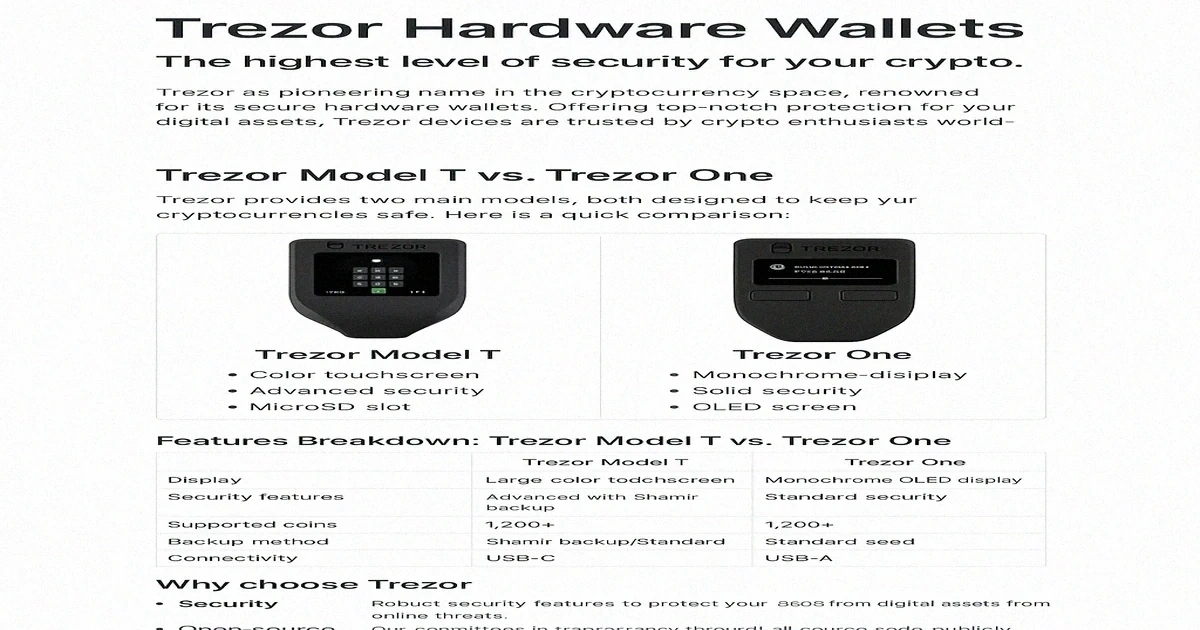
Trezor is the world's first Bitcoin hardware wallet, built by SatoshiLabs in Prague — the company was founded in 2013 and shipped its first device, the Model One, in 2014. The current line is the Trezor Safe range: the Safe 3 at $59, the Safe 5 at $129, and the flagship Safe 7 at $249. All three keep private keys offline on a dedicated chip and support 8,000+ coins and tokens. Trezor now reports over two million users holding billions in crypto on its devices.
The defining feature is open-source firmware. Every line of Trezor's code is publicly auditable on GitHub. If a vulnerability exists, security researchers can find and report it. Ledger, by comparison, runs proprietary firmware on its secure element — you trust the company rather than verifying the code. The Safe line narrows the historical gap here: every current model pairs that open-source firmware with a certified Secure Element (EAL6+), so sensitive material such as the PIN and seed is held in tamper-resistant hardware rather than a general-purpose microcontroller. Older devices like the Model One and Model T lacked a Secure Element, which is why the Safe range was introduced to replace them.
In practice, no remotely exploited Trezor has been reported in over a decade of operation. The Kraken Security Labs voltage glitching attack in 2020 targeted an older microcontroller-based device, required physical possession and specialised equipment, and is mitigated by the Secure Element in the Safe line. For remote threats — malware, phishing, exchange hacks — Trezor's air-gapped signing model provides the same protection as any hardware wallet. Your keys never touch your computer's operating system.
This review covers the full Safe line, the Trezor Suite desktop app, Multi-share Backup, MetaMask integration, and honest limitations compared to Ledger and Tangem. If your primary concern is firmware transparency and you hold BTC, ETH, or major ERC-20 tokens, Trezor is amongst the strongest open-source options available.
What Is Trezor?
Trezor stores your private keys on a dedicated chip that never connects to the internet. When you sign a transaction, the unsigned data travels to the device via USB. The device displays the recipient and amount on its own screen for verification, signs internally, and returns only the signed output. Your keys never leave the chip — even if your computer is infected with malware, the attacker cannot extract them.
The Safe 3 ($59) covers most needs: a Secure Element, USB-C, 8,000+ supported assets, two physical buttons, and the full Trezor Suite experience. The Safe 5 ($129) adds a colour touchscreen with haptic feedback for on-device passphrase entry (more secure than typing on a potentially compromised keyboard) and a microSD slot. The flagship Safe 7 ($249) goes further with a larger touchscreen, Bluetooth and Qi2 wireless charging. Multi-share Backup (Shamir, SLIP-39), which splits your seed into multiple shares where any 2-of-3 can reconstruct it, is available across the whole Safe line on recent firmware — it is no longer a single-model feature. If you hold a modest amount of crypto, the Safe 3 provides the same core security as its pricier siblings; the touchscreen and wireless conveniences are what you pay extra for higher up the range.
Trezor Suite is the desktop companion app (Windows, macOS, Linux) for managing your portfolio, sending transactions, and accessing advanced features. Connect your Trezor to MetaMask via USB to sign Ethereum DeFi transactions with hardware-level security — your keys stay on the device while you interact with Aave, Uniswap, and other protocols. The combination of open-source firmware, Trezor Suite, and MetaMask integration gives you full DeFi access without exposing private keys to a browser extension.
Trezor Model Comparison
Trezor Safe 3
Is the Safe 3 right for you? The entry-level model, which replaced the Model One in late 2023, offers essential security at $59 with a 0.96" monochrome display (128x64) and two physical buttons for navigation. It connects over USB-C, carries a certified Secure Element (EAL6+), and supports 8,000+ coins and tokens. You get core security features including PIN protection, passphrase support, and seed phrase backup, plus Multi-share Backup on recent firmware. This model is ideal if you are a Bitcoin holder or beginner seeking affordable hardware security.
Trezor Safe 5
What makes the Safe 5 worth the premium? The mid-tier model, which replaced the Model T in 2024, costs $129 and features a 1.54" colour touchscreen (240x240) with haptic feedback for intuitive on-device navigation and passphrase entry. It connects over USB-C, sits in an aluminium frame, and includes a microSD card slot for encrypted storage. It carries the same Secure Element (EAL6+) and 8,000+ asset support as the Safe 3. Key features include Multi-share Backup for splitting recovery phrases and U2F authentication for two-factor security. This model suits you if you prefer touchscreen confirmation or manage a larger portfolio.
Trezor Safe 7
What does the flagship add? The Safe 7 is the newest and most capable model at $249. It pairs a larger 2.5" colour touchscreen (520x380) with a dual secure element design — the auditable, open TROPIC01 chip working alongside a separate EAL6+ certified secure element (Optiga Trust M) — giving you the transparency of auditable hardware as well as auditable firmware. Beyond USB-C it adds Bluetooth 5.0 and Qi2 wireless charging, and it is built on a quantum-ready foundation. It supports the same 8,000+ assets and Multi-share Backup as the rest of the line. This model suits you if you want wireless convenience and the most future-proof option Trezor offers.
Which Model Should You Choose?
Choose the Safe 3 if you are new to hardware wallets, hold Bitcoin/Ethereum primarily, or want affordable security. You get the same Secure Element and core protections as the rest of the line at the lowest price.
Choose the Safe 5 if you prefer touchscreen navigation and on-device passphrase entry, or want an aluminium build with a microSD slot. Step up to the Safe 7 if you want Bluetooth, wireless charging, the open-source TROPIC01 secure element, and the most future-proof device. Multi-share Backup is available across all three.
Security Architecture and Features
Open-Source Advantage
Why is open-source important for security? Trezor's open-source development provides unique security benefits. All firmware and software code is publicly available, so security researchers worldwide can identify vulnerabilities. This transparency ensures there are no hidden backdoors. You can verify code through reproducible builds, whilst community contributions enhance security and functionality.
Hardware Security Features
How does Trezor protect your keys at the hardware level? Trezor devices implement multiple security layers. Secure boot uses cryptographic verification, whilst a tamper-evident design makes modifications detectable. Every current Safe model includes a certified Secure Element (EAL6+) that isolates the PIN and seed, with the Safe 7 using the open-source TROPIC01 chip. You get hardware that prevents side-channel attacks, with sensitive data isolated and encrypted.
Advanced Security Protocols
Multi-Signature Support
How can you add extra security layers? Trezor supports multi-signature configurations, allowing you to create wallets that require multiple signatures. Common setups include 2-of-3 configurations for corporate custody and inheritance planning. You can distribute security risk with flexible thresholds from 1-of-2 up to 15-of-15.
Passphrase Protection
What is passphrase protection, and should you use it? Passphrase protection adds a security layer by creating hidden wallets that are mathematically impossible to detect. Each unique passphrase generates a completely separate wallet, providing plausible deniability since there's no way to prove hidden wallets exist. You can create unlimited hidden wallets with different passphrases, offering duress protection by revealing only the main wallet under coercion. However, you must back up passphrases separately from seed phrases to ensure recovery access.
Firmware Security and Updates
Secure Update Process
How does Trezor ensure firmware updates are safe? Trezor implements a robust firmware update system that maintains security while enabling new features and bug fixes. All firmware updates are digitally signed by Trezor's private keys, and the secure bootloader prevents installation of unauthorised firmware. You're protected from firmware downgrade attacks through version checking, whilst the device displays firmware fingerprints for manual verification. The bootloader mode allows you to recover from a corrupted firmware in an emergency.
Security Audit History
How is Trezor's security actually verified? The strongest answer is structural rather than a single audit badge: all firmware and Suite code is published on GitHub, so any researcher can inspect it, and reproducible builds let you confirm the firmware on your device matches that public source. A public bug bounty rewards researchers who report vulnerabilities, and disclosed issues — such as the Kraken Security Labs physical-glitch research — are documented on Trezor's blog along with the mitigations. This open, verifiable process is the substance behind the security claims, rather than reliance on a closed proprietary review.
Physical Security Considerations
Device Tampering Protection
Trezor devices include multiple layers of protection against physical attacks. Ultrasonic welding makes opening the device extremely difficult. Physical modifications leave visible traces of interference. Your private keys are stored in protected memory that erases under attack. The PIN pad uses a random layout to prevent shoulder-surfing. Auto-lock features ensure your device locks after periods of inactivity.
Environmental Protection
How reliable is your Trezor in different conditions? The battery-free Safe 3 and Safe 5 are rated to operate from -20°C to +60°C; the battery-equipped Safe 7 has a narrower safe range, so it is worth keeping away from extreme heat or cold. Sealed construction prevents moisture damage. ESD protection prevents damage from static electricity. Your device-level PIN prevents unauthorised access, with additional passphrase support for extra security. The 12- or 24-word backup phrase enables wallet recovery. The device automatically wipes itself after 16 failed PIN attempts, protecting you against brute-force attacks.
Advanced Security Options
What extra security options can you access across the Safe line? Every model offers Multi-share Backup, which splits your mnemonic phrase into multiple shares for enhanced backup security. You can create hidden wallets with different passphrases for additional privacy. The device functions as a U2F authentication device for two-factor security. You also get GPG encryption for secure email and SSH authentication for secure server access.
Security Considerations
What should you watch for with security? Every current Safe model carries a certified Secure Element, so unlike the discontinued Model One you are no longer choosing between a device with and without one. You should keep your device secure from physical tampering. Always purchase only from authorised retailers to avoid supply chain attacks. Regular firmware updates patch security vulnerabilities. Your recovery phrase must be stored securely offline.
Setup and Installation Guide
Initial Setup Process
Setup begins with unboxing verification. First, check your package integrity and authenticity seals. Next, download Trezor Suite from the official trezor.io website. Then connect your device using the provided USB cable. You should install firmware if needed during the initial connection process.
Create a new wallet or restore from an existing backup by following the on-screen instructions. Write down your 12 or 24-word recovery phrase on the provided backup cards using permanent ink. Set up a PIN (anywhere from a few digits up to 50) for device access, then verify your backup by entering selected words from your recovery phrase.
Trezor Suite Software
Trezor Suite is the official desktop application. You can view all your balances and current market values at a glance. You can send, receive, and track transactions across all supported cryptocurrencies. The interface lets you add different cryptocurrencies easily and manage your security settings, including PIN and passphrase configuration.
Privacy features include built-in Tor integration for anonymous blockchain queries. (Note that Trezor Suite discontinued its own CoinJoin service in June 2024 after the coordinator shut down; Bitcoin coinjoin is now only possible through third-party wallets with other coordinators.) The backup system helps create and verify recovery backups, ensuring you can always access your funds.
Mobile and Web Integration
Trezor now publishes an official Trezor Suite mobile app for iOS and Android. On Android, every current model works fully over a USB-C cable; on iPhone, the Safe 7 connects fully over Bluetooth, while older models are limited to view-only access. Trezor Connect additionally provides browser-based access without a desktop install. MetaMask integration allows secure DeFi access while maintaining hardware wallet security, and you can connect to exchanges for hardware-backed trading security.
Best Practices
How should you set up your device safely? Choose a private, secure location away from cameras and other people. Write your seed phrase on paper with permanent ink. Never store it digitally on any device. Make multiple backup copies and store them in different secure locations. You should test the recovery process with small amounts first. Always verify firmware authenticity before installing updates.
Supported Cryptocurrencies
Major Cryptocurrencies
Bitcoin support on Trezor includes full SegWit and Taproot implementation. You benefit from enhanced transaction efficiency and privacy features that optimise your network fees. Ethereum support provides native functionality for ETH transactions plus complete compatibility with all ERC-20 tokens. You can manage diverse Ethereum-based assets from a single secure device. Litecoin integration offers complete support, including SegWit functionality for reduced network fees.
Bitcoin Cash support encompasses full functionality for both Bitcoin Cash chains, ensuring users can manage their BCH holdings regardless of which fork they prefer or need to access. Ripple integration provides native XRP support with proper handling of the unique requirements and transaction structures specific to the Ripple network protocol. Cardano support is available across the current Safe line with full staking functionality that allows users to participate in network validation while maintaining hardware wallet security.
Monero (XMR) is not supported in Trezor Suite. You can use XMR with a Trezor Safe 3, Safe 5 or Model T only through external wallets such as the official Monero GUI or CLI; on the newer Safe 7 it is not yet usable, because third-party wallet support is still pending. If a private-coin workflow inside Suite is your priority, this is a real limitation to weigh. Dogecoin, by contrast, is supported natively on every current Trezor model with full transaction functionality.
Token Standards
ERC-20 token support gives you full access to the ecosystem of Ethereum tokens, including stablecoins, governance tokens, and utility tokens. How can you manage NFTs securely? ERC-721 support enables NFT management through MetaMask integration, allowing you to store and transfer non-fungible tokens while maintaining hardware wallet security for your private keys. BEP-20 token compatibility provides you with access to Binance Smart Chain tokens, so you can participate in the BSC ecosystem while maintaining the security benefits of hardware wallet storage.
TRC-20 support includes Tron network tokens, giving users access to the Tron ecosystem and its various decentralised applications and token offerings. SPL token support offers limited functionality for Solana-based tokens, though this support continues to expand as the Solana ecosystem grows and develops new standards and protocols.
DeFi and Staking Support
Ethereum staking functionality provides native support for ETH 2.0 staking through various integration platforms, enabling users to participate in network validation while maintaining hardware wallet security for their staking keys and rewards. Cardano staking offers native ADA staking capabilities across the current Safe line, allowing users to delegate their stake to validation pools and earn rewards while keeping their private keys secure on the hardware device. DeFi protocol access is facilitated through MetaMask and other wallet integrations, enabling users to interact with decentralised finance applications while maintaining the security benefits of hardware-based transaction signing.
Yield farming participation becomes possible through secure DeFi protocol interactions, allowing users to provide liquidity and earn rewards while ensuring that all transaction confirmations occur on the hardware device for maximum security. Governance token functionality enables users to hold and participate in DAO voting processes, maintaining their voting rights while keeping their governance tokens secure in a hardware wallet.
Coin Addition Process
Automatic detection ensures that popular cryptocurrencies appear in the Trezor Suite interface without requiring manual configuration, streamlining your experience for commonly held assets. How do you add custom tokens? Manual addition capabilities let you add tokens by entering contract addresses and token details, providing flexibility for managing newer or less common cryptocurrency assets. Third-party integration support enables you to access additional cryptocurrencies through external wallet software that maintains compatibility with Trezor hardware security while expanding your range of supported assets.
Community request processes allow you to submit requests for new cryptocurrency support, with Trezor prioritising additions based on user demand and technical feasibility assessments. How often are new coins added? Regular update cycles ensure that new cryptocurrencies are added consistently through firmware updates, keeping your Trezor device current with the evolving cryptocurrency landscape and emerging blockchain networks.
User Experience and Interface
Trezor Suite Interface
The clean design philosophy emphasises a modern, intuitive interface with clear navigation. You can manage your cryptocurrency at any experience level without feeling overwhelmed. The dashboard overview provides a full portfolio view with interactive charts. You can track your investments and performance over time. Transaction history offers detailed logs with search and filtering by date, amount, and address. You can easily locate specific transactions for tax reporting and portfolio management.
Security indicators throughout the interface provide clear visual feedback about device status, connection security, and transaction verification states to ensure users always understand their security posture. Theme customisation includes both dark and light mode options that accommodate user preferences and different lighting conditions for comfortable extended use. Multi-language support covers English plus several major languages — including Spanish, German, French, Italian, Czech, Brazilian Portuguese and Turkish — with additional community translations, making Trezor Suite accessible to a wide international audience.
Device Interaction
The Safe 3 features simple two-button navigation with clear on-screen prompts. You can complete all device operations without confusion, even if you are not comfortable with complex technology. The Safe 5 and Safe 7 provide an intuitive colour touchscreen with haptic feedback. You get faster navigation through menus and quicker transaction confirmations. Every model displays clear, detailed information about all transaction parameters before requiring your approval.
PIN entry utilises a secure randomised number layout that prevents shoulder surfing attacks and keylogger threats by changing the position of numbers on the screen for each PIN entry attempt. The recovery process includes detailed step-by-step guidance for wallet restoration, ensuring users can successfully recover their wallets even in stressful situations where they need to regain access to their funds.
Learning Curve
How quickly can you get started? The beginner-friendly approach includes a guided setup process with clear instructions. You do not need extensive technical knowledge or cryptocurrency experience. Educational resources cover everything from basic setup to passphrase wallets and Shamir Backup. You can learn at your own pace and reference materials when needed. Community support provides access to active forums where experienced users help newcomers.
Video guides offer official tutorial content for common tasks and procedures, providing visual learners with clear demonstrations of proper device usage and security practices. Progressive complexity design ensures that power-user features remain available for experienced users while not overwhelming beginners, allowing users to grow into more sophisticated functionality as their knowledge and confidence increase over time.
Performance and Reliability
How does your Trezor perform day to day? Transaction processing is fast, so you will not face delays during time-sensitive trading. Connection reliability provides consistent USB connectivity with minimal disconnections. The Safe 3 and Safe 5 are battery-free, drawing power directly from USB so there is nothing to charge; the Safe 7 adds a rechargeable LiFePO4 battery to power its Bluetooth and Qi2 wireless features.
Durable construction ensures reliable operation over many years of regular use. Regular update cycles deliver firmware and software improvements that keep your device current with evolving security standards.
Trezor vs Competitors
Trezor vs Ledger
Trezor's primary advantages over Ledger include its commitment to open-source firmware that allows complete security auditing by the global community and privacy features that don't collect on-chain user data. On breaches, both companies belong to the same class: neither device has been remotely compromised, but both have leaked customer contact data. Trezor's newsletter list was abused for phishing after a 2022 MailChimp incident, and in January 2024 a third-party support portal was breached, exposing the names and email addresses of up to around 66,000 customers who had contacted support. As with Ledger's 2020 e-commerce leak, the breached systems held contact data, not keys — but the honest framing is a shared exposure to data incidents, not a spotless record. The open-source approach still provides transparency that enables independent verification of Trezor's security claims.
However, Trezor's catalogue, while now well into the thousands, still trails Ledger's coin count in some niche areas, and the flagship Safe 7 sits at a premium price. Despite this, Trezor is a strong fit for users who prioritise transparency and open-source security — and with the Safe line, the historical secure-element gap has closed.
Trezor vs KeepKey
If you compare build quality, Trezor comes out ahead with more frequent firmware updates and support for 8,000+ coins and tokens. KeepKey supports fewer assets, so your portfolio options are more limited. Trezor costs more, but you get more features and a larger development community behind your device.
Trezor vs BitBox
With over a decade of proven security, Trezor gives you a larger user community and better functionality through Trezor Suite. BitBox includes a secure element chip, but if you manage multiple cryptocurrencies, Trezor is the stronger choice for your portfolio.
Trezor vs ColdCard
If you hold a diverse portfolio beyond Bitcoin, Trezor supports many cryptocurrencies and is easier to use. ColdCard focuses exclusively on Bitcoin security and supports air-gapped operation, so your choice depends on whether you need multi-coin support or Bitcoin-only maximalism.
Trezor vs Software Wallets
Hardware wallets keep your keys offline, where malware cannot read them. A compromised computer can still present a malicious transaction, so verify the recipient on the device screen. You will pay more than for a software wallet, and they are less convenient for quick trades, but they are essential if you hold serious cryptocurrency positions.
Pros and Cons Analysis
Pros
Trezor's pioneer status as the first hardware wallet provides an unmatched proven track record spanning over ten years of continuous operation without major security breaches or fundamental design flaws. The open-source security approach ensures complete transparency through auditable code, enabling the global security community to continuously verify and improve the platform's security implementation. The three-model Safe lineup offers flexibility: the budget-friendly Safe 3 provides essential security with a certified Secure Element, the Safe 5 adds a colour touchscreen and microSD slot, and the flagship Safe 7 delivers Bluetooth, wireless charging and the open-source TROPIC01 secure element — with Multi-share Backup available across all three.
Trezor Suite software provides full wallet management capabilities, including portfolio tracking, transaction management, and built-in Tor routing in a single, well-designed application. Strong privacy protection includes no on-chain data collection and native Tor support, helping users maintain anonymity while managing their holdings (note that Suite's own CoinJoin service was retired in June 2024; Bitcoin coinjoin now requires a third-party wallet). Wide cryptocurrency support includes 8,000+ digital assets, spanning major cryptocurrencies, tokens, and emerging blockchain networks, to accommodate diverse investment strategies.
Regular updates ensure continuous improvement. Educational resources include documentation and tutorials. A strong community trust has been built over the years. Notable features include Shamir Backup and U2F authentication.
Cons
You should be aware that the flagship Safe 7 is expensive at $249. Mobile signing is uneven across the range: the official app gives Android users full USB-C access on every model, but on iPhone only the Safe 7 can sign, leaving older models view-only there. Physical attacks require direct device access and specialised equipment, but you must still keep your Trezor in a secure location. The learning curve can challenge you if you are new to hardware wallets. Only the Safe 7 has Bluetooth; the Safe 3 and Safe 5 are USB-C only. Your backup requires careful management to avoid permanent fund loss. Customer support relies largely on community channels. Some features need specific firmware versions. You should only buy from authorised sources to avoid tampered devices.
Pricing and Value Analysis
Current Pricing
The Trezor Safe 3 is priced at $59 USD, positioning it as an affordable entry point into hardware wallet security with a certified Secure Element and no compromise on essential protection features. The Trezor Safe 5 sits at $129 USD, reflecting its colour touchscreen interface, aluminium frame, microSD slot, and haptic feedback. The flagship Trezor Safe 7 commands $249 USD, adding Bluetooth 5.0, Qi2 wireless charging, the open-source TROPIC01 secure element, and a larger touchscreen. Shipping policies include free shipping on orders over a set threshold, so a Safe 7 typically ships free, while a single Safe 3 purchase may incur additional shipping costs depending on location and order total.
All three Safe models include a 2-year limited warranty for individual customers (one year for business customers), covering manufacturing defects and hardware failures under normal use conditions, from the delivery date. Additional accessories, including extra cables, protective cases, and backup cards, are available for purchase to enhance device protection and provide backup options.
Value Proposition
The Safe 3 delivers excellent value as an entry-level option that provides professional-grade security features — including a certified Secure Element — typically found in much more expensive solutions, making offline key isolation accessible to individual users and small investors. The Safe 5 and Safe 7's higher pricing is justified by their touchscreen interfaces and, on the flagship, wireless connectivity and the open-source secure element, all of which significantly improve daily interaction with the device. The long-term investment perspective recognises that hardware wallets protect potentially much larger cryptocurrency holdings, making the device cost insignificant compared to the value of assets being secured.
The one-time purchase model eliminates ongoing subscription fees or recurring costs that are common with other security solutions, providing permanent ownership of security infrastructure without additional financial obligations. Insurance considerations may include reduced premiums for cryptocurrency insurance policies when hardware wallet storage is demonstrated, potentially offsetting device costs through lower insurance expenses for large holdings.
Cost Comparison
Compared to exchange custody fees, hardware wallets eliminate ongoing costs while removing the risks associated with keeping funds on centralised platforms that may be subject to hacks, regulatory actions, or operational failures. The device cost represents a fraction of typical cryptocurrency insurance policy premiums, providing superior security at a lower total cost than traditional insurance approaches for digital asset protection. The small upfront investment becomes negligible compared to the potential financial losses from security incidents, hacks, or theft resulting from inadequate cryptocurrency storage practices.
Competitive pricing analysis shows Trezor devices offer comparable or superior value compared to similar hardware wallets when considering features, security track record, and ongoing support quality. Return on investment calculations demonstrate that the device pays for itself by preventing even a single security incident, making it an essential investment for anyone holding significant cryptocurrency amounts or planning long-term digital asset accumulation.
Advanced Features and Use Cases
Multi-share Backup (Across the Safe Line)
The Multi-share Backup feature, also known as Shamir Backup (SLIP-39), enables users to divide their mnemonic phrase into multiple shares using Shamir's Secret Sharing cryptographic technique, eliminating single points of failure in backup storage systems. It is supported across the entire current Safe range on recent firmware, not just one model. Threshold recovery mechanisms require only a subset of shares for wallet restoration, allowing users to create redundant backup systems where losing some shares doesn't result in permanent fund loss. Enhanced security comes from distributing backup responsibility across multiple secure locations or trusted parties, making it virtually impossible for any single compromise to threaten wallet security.
Family sharing applications allow users to distribute backup shares amongst trusted family members, creating inheritance planning solutions that ensure cryptocurrency access can be recovered by survivors without compromising current security. Business use cases include multi-signature-like backup arrangements for organisations that need distributed control over cryptocurrency assets while maintaining operational security and preventing single-person dependency for fund access.
Privacy and Anonymity
Tor integration enables users to route all Trezor Suite traffic through the Tor network, providing anonymous blockchain queries and transaction broadcasting that protect user privacy from network surveillance and traffic analysis. Trezor Suite previously offered built-in CoinJoin for Bitcoin, but that service was discontinued in June 2024 after its coordinator shut down; coinjoin-style mixing is now available only through third-party wallets that connect to other coordinators. Multiple account functionality allows users to create separate accounts for different purposes, enabling compartmentalisation of funds for various activities while maintaining organisational clarity.
Passphrase wallet capabilities enable the creation of hidden wallets using custom passphrases, providing plausible deniability and protection against coercion by allowing users to reveal only decoy wallets while keeping substantial holdings secure. The no-data-collection policy ensures that Trezor doesn't track, store, or analyse user transaction data, maintaining complete privacy for user activities and cryptocurrency holdings.
Developer and Power User Features
Command line interface access allows advanced users to interact with Trezor devices programmatically, enabling automation of operations and integration with custom scripts and applications for sophisticated cryptocurrency management workflows. Custom firmware capabilities enable users to compile and install modified firmware versions, giving them ultimate control over their device's functionality and security for specialised use cases. API access enables developers to integrate Trezor functionality into their applications, creating custom solutions that leverage hardware wallet security for business or personal cryptocurrency management systems.
Testnet support allows users to experiment with Bitcoin and Ethereum test networks without risking real funds, providing safe environments for learning, development, and testing of new features or applications. Debugging tools provide detailed troubleshooting and development capabilities for users who need detailed device information and diagnostic functionality for technical support or custom development projects.
Enterprise and Business Use
Multi-user management capabilities enable organisations to manage multiple devices and users through centralised administration systems that maintain security while providing operational oversight and control. Full audit trails provide detailed logging for compliance requirements, ensuring that all device activities and transactions are properly documented for regulatory reporting and internal security monitoring. Integration APIs connect business systems and workflows to the device, so existing enterprise cryptocurrency management and treasury operations can pass unsigned transactions to the hardware for signing and receive back only the signed output.
Bulk purchasing options include volume discounts for large orders, making Trezor devices cost-effective for organisations that need to deploy hardware wallets across multiple users or departments. Custom branding opportunities provide white-label options for enterprise clients who want to incorporate Trezor security into their own branded cryptocurrency solutions while maintaining the underlying security architecture and functionality that makes Trezor devices trusted by security professionals worldwide.
Common Issues and Troubleshooting
Connection Problems
Device recognition issues can often be resolved by trying different USB ports on the computer, updating device drivers through the operating system's device manager, or restarting the computer to refresh USB controller states and clear any temporary connection conflicts. Firmware update failures typically result from unstable connections and can be addressed by using a different USB cable, ensuring a stable physical connection throughout the update, or attempting the update on a different computer with better USB port reliability.
Trezor Suite connection problems may stem from conflicts with other wallet software running simultaneously, requiring users to close competing applications, or from firewall settings that block the necessary network connections for device communication. Slow performance issues can be addressed by closing unnecessary applications that consume system resources, using USB 2.0 ports instead of USB 3.0 when compatibility issues arise, or ensuring adequate system memory is available for smooth operation. Bridge software issues require reinstalling the Trezor Bridge software and checking for conflicts with antivirus programs or other security software that might interfere with device communication protocols.
Transaction Issues
Transaction broadcasting failures typically indicate network connectivity problems and can be resolved by checking internet connection stability, switching to different blockchain servers within Trezor Suite, or waiting for network congestion to decrease before attempting to broadcast again. High transaction fees can be managed by adjusting fee settings to lower priority levels when time isn't critical, or by timing transactions during periods of lower network congestion when fees naturally decrease due to reduced demand for block space.
Stuck transactions can be resolved using replace-by-fee functionality to increase transaction fees and prioritise processing, or child-pays-for-parent techniques where a new transaction with higher fees encourages miners to process the original transaction. Address format errors occur when sending to incompatible address types and can be prevented by ensuring the recipient address format matches the sender's wallet capabilities and network requirements. Insufficient funds errors require accounting for transaction fees in balance calculations, as the total transaction amount plus fees must not exceed the available balance in the sending account.
Recovery and Backup Issues
Lost recovery phrases represent permanent and irreversible fund loss, as there is no way to recover cryptocurrency access without the original seed words, emphasising the critical importance of secure backup storage and verification procedures. Forgotten PIN situations can be resolved by using the recovery seed phrase to restore the wallet on a new device or after performing a device reset, though this process requires access to the properly stored backup phrase. Damaged-device scenarios require using the recovery seed phrase with a new Trezor device or compatible wallet software, underscoring the importance of secure seed phrase storage over physical device protection.
Incorrect seed word problems during recovery require double-checking the spelling and order of all words against the original backup, as even small errors in word selection or sequence will prevent successful wallet restoration. Passphrase issues arise when users forget the exact passphrase used to create hidden wallets, including precise spacing and capitalisation, as passphrases are case-sensitive and must be entered exactly as originally created to access the associated funds.
Conclusion
After thorough testing, Trezor continues to set the standard for hardware wallet security. Over a decade of operational history with zero remote compromises, combined with fully open-source firmware, makes it an exceptional choice for cryptocurrency storage. Whichever Safe model you choose, you are investing in a device that prioritises security and transparency above all else.
What Impressed Us
Trezor's fully open-source firmware stands out as its defining advantage. Every line of code is auditable on GitHub, meaning security researchers worldwide can verify there are no hidden backdoors. This level of transparency is rare in the hardware wallet industry, and the Safe 7's open-source TROPIC01 secure element extends that auditability into the hardware itself. Multi-share Backup, available across the whole Safe line, lets you split your recovery phrase into multiple shares, eliminating the single point of failure that plagues standard seed phrase backups.
Passphrase protection adds another layer by generating mathematically separate hidden wallets, giving you plausible deniability under duress. The colour touchscreen on the Safe 5 and Safe 7 ensures PIN entry and transaction verification happen directly on the device, keeping sensitive input away from potentially compromised computers. Since launching in 2014, Trezor has maintained a strong track record with no major firmware breaches, a record few competitors can match.
What Concerned Us
The entry-level Safe 3's small 0.96" monochrome display makes transaction verification slower — you scroll through longer addresses in smaller chunks, which increases the risk of confirmation errors compared with the touchscreen models. Stepping up to the Safe 5 or Safe 7 solves this, but it adds cost.
Trezor Suite is functional for portfolio management and transactions, but it feels less polished than Ledger Wallet in terms of interface design and feature discoverability. Mobile is now covered by an official Trezor Suite app, though with caveats worth understanding: on Android every model works fully over USB-C, but on iPhone only the Bluetooth-equipped Safe 7 can sign transactions — older models are view-only there. So if you want full on-the-go signing from an iPhone, the Safe 7 is effectively the model you need.
Who Should Use Trezor
If you are an open-source advocate who values auditable code over proprietary black-box security, Trezor is the natural choice. Bitcoin maximalists benefit from excellent integration with specialist wallets like Electrum and Sparrow, which provide coin control and detailed UTXO management that go well beyond what bundled software offers.
If you are migrating from exchange storage for the first time, the Safe 3 at $59 provides institutional-grade offline key storage — including a certified Secure Element — at a price point that removes any excuse for leaving funds on a centralised platform. You get the same core security as the pricier touchscreen models, making it the most accessible entry point into hardware wallet self-custody.
Frequently Asked Questions
- Is Trezor open-source?
- Yes, its firmware and software are completely open-source. It includes independent security audits and community verification of the code. This transparency is a key security advantage over closed-source alternatives.
- Which Trezor model is better for beginners?
- The Trezor Safe 3 is ideal for beginners due to its lower price ($59) and simple two-button interface. It offers the same core security and certified Secure Element as the rest of the line. The Safe 5 ($129) adds a colour touchscreen, and the Safe 7 ($249) adds Bluetooth and wireless charging — handy for advanced users.
- Can I store NFTs on Trezor?
- Yes, you can store NFTs on Trezor by connecting it to MetaMask or other compatible wallets. The Trezor secures your private keys while the connected wallet interface manages NFT display and transactions.
- How secure is Trezor compared to Ledger?
- Both are highly secure, but they use different approaches. The current Trezor Safe line pairs open-source firmware and secure boot with a certified Secure Element (EAL6+). Ledger uses a proprietary secure element. Trezor's main differentiator is transparency, with the Safe 7 even using an open-source secure element, while Ledger keeps its hardware design closed.
- What cryptocurrencies does Trezor support?
- The current Safe line supports 8,000+ coins and tokens. It includes Bitcoin, Ethereum, Litecoin, and Bitcoin Cash, plus most ERC-20 tokens, as well as assets such as Cardano and Dogecoin. Support for the major assets is consistent across the Safe 3, Safe 5, and Safe 7, and new coins are added with firmware updates. (Monero is an exception: it works only via external wallets, and not yet on the Safe 7.)
- What happens if I lose my Trezor device?
- You can recover your wallet using your 12- or 24-word recovery seed on a new Trezor or compatible wallet. That makes secure offline seed storage essential.
- Can I use Trezor with my mobile phone?
- Yes. Trezor Suite is available as an official mobile app for iOS and Android. On Android, every current model works fully over a USB-C cable; on iPhone, the Safe 7 connects fully over Bluetooth, while older models are limited to view-only access. A desktop computer with Trezor Suite still offers the most complete experience.
- How often should I update my Trezor firmware?
- Update whenever a new version is released. Firmware updates provide security fixes and improvements. Trezor Suite will notify you when updates are available. Always update only via official Trezor channels.
- Is it safe to buy a used Trezor?
- No. A used Trezor could be tampered with or have a known recovery seed. Always buy new devices from official Trezor or authorised retailers.
- Can I use Trezor for DeFi and staking?
- Yes. You can use Trezor with MetaMask or other Web3 wallets to participate in DeFi. For staking, it supports Ethereum staking via integrations and Cardano staking across the current Safe line. It keeps your private keys secure.
Sources & References
- Trezor Official Website - Hardware wallet manufacturer and official platform
- Trezor Wiki Documentation - Comprehensive user guides and technical documentation
- Trezor Blog & Updates - Latest security updates and product announcements
Affiliate Disclosure
This page contains affiliate links. When you sign up through our referral links, we may earn a commission at no additional cost to you. This helps support our platform and allows us to continue providing valuable content and recommendations.