Crypto Exchange Order Types Guide
Every order type on Binance, OKX, and Kraken explained through real trading scenarios — so you know exactly which order to place, when, and why.
Introduction
When you open the trading page on Binance, OKX, or Kraken for the first time, you see a row of tabs: Market, Limit, Stop-Limit, OCO, Trailing Stop. Most beginners click "Market" because it is the simplest — but that simplicity costs you money on every single trade. Understanding order types is not optional if you want to minimise your trading fees, protect your positions from sudden crashes, and execute your investment strategy with precision rather than hope.
Here are the five order types you will encounter and what each one does:
- Market order — executes immediately at the current price
- Limit order — executes only at your specified price or better
- Stop-limit order — triggers a limit order when a price threshold is reached
- OCO order — combines take-profit and stop-loss, one cancels the other
- Trailing stop — follows the price upwards, sells when it reverses by your set percentage
Each order type solves a specific problem. A market order gives you instant execution when speed matters more than price. A limit order lets you set your exact entry or exit price, saving you fees and improving your average cost. A stop-limit order protects your portfolio from catastrophic losses by automatically selling if the price drops below your risk threshold. An OCO order lets you set both a take-profit and stop-loss target simultaneously, so your position is managed even when you are not watching. A trailing stop rides an upwards trend and locks in profits automatically when the trend reverses.
This guide walks you through each order type with real Bitcoin and Ethereum trading scenarios using actual £ amounts. You will learn not just what each order does, but when you should use it, how the blockchain-based exchange order book processes your instruction, and the specific mistakes that cost beginners money. If you are completely new to cryptocurrency exchanges, read our first 30 days guide first. For a detailed breakdown of the fees each order type incurs, see our exchange fees guide.
Whether you are running a simple DCA strategy with weekly limit orders, actively trading cryptocurrency tokens on the spot market, or exploring staking yield through your exchange wallet, the concepts in this guide apply to every centralised exchange. The interface labels differ slightly between platforms, but the underlying mechanics — how your order interacts with the order book, how maker and taker transaction fees apply, and how execution priority works — are universal across Binance, OKX, Kraken, Bybit, and Coinbase.
You should also understand that order types work the same whether you are trading Bitcoin (secured by proof-of-work mining and consensus), Ethereum (secured by proof-of-stake validators), or any other token listed on the exchange. The differences between assets affect your investment thesis and risk profile, but not how you place orders. A limit buy for BTC works identically to a limit buy for ETH or any DeFi governance token — the order book protocol processes them all the same way.
Market Orders: Buy or Sell Now
How a Market Order Works
A market order tells the exchange: "buy (or sell) this asset right now, at whatever price is currently available." The trade executes immediately by matching against the best existing orders in the order book. You get speed and certainty of execution, but you give up control over the exact price you pay.
When should you use a market order? In situations where speed matters more than price precision. For example, if you hold BTC and the price is crashing 15% in an hour due to a major security breach or regulatory announcement, a market order gets you out immediately. A limit order might not fill if the price is falling faster than your limit can keep up. In a genuine emergency, the 0.1-0.5% you lose to taker fees and slippage is insignificant compared to the 5-10% you save by exiting quickly.
Fees and Slippage on Market Orders
What does a market order cost you? On Binance, you pay the taker fee (0.10% at the base tier, or 0.075% with BNB discount). On Kraken, the taker fee is 0.26% — significantly more expensive. You also pay the bid-ask spread, which is the difference between the best buy and best sell prices in the order book. On BTC/USDT on Binance, this spread is typically 0.01% (negligible). On less liquid pairs like AVAX/GBP on Kraken, the spread can be 0.2-0.5%, adding a hidden cost to your market order.
How does slippage affect your market order? If you place a market buy for £10,000 of BTC and the order book only has £3,000 of liquidity at the best ask price, your order will eat through multiple price levels — filling £3,000 at the best price, then £4,000 at the next price level, then £3,000 at an even higher price. Your average execution price ends up worse than the quoted price. This is slippage, and it costs you more on larger orders and less liquid trading pairs. For orders under £500 on major pairs, slippage is negligible. For orders over £5,000, you should always use a limit order instead.
A practical rule: if your trade size is less than 0.1% of the daily trading volume on that pair, a market order will execute with minimal slippage. If your trade is larger, use a limit order to control your execution price.
Most exchanges also offer a "Convert" or "Quick Buy" interface that hides the order book entirely. On Binance, Convert quotes you a fixed price valid for 6 seconds — accept it and the trade settles instantly. The convenience comes at a cost: the embedded spread is typically 0.10-0.20% versus the 0.10% taker fee plus near-zero spread you would pay on the spot order book. On a £50 buy, the difference is about 5p — irrelevant. On a £5,000 buy, the difference is £5-10 — meaningful enough to justify learning the spot interface. Convert is a good training-wheels option for the first week; spot order book trading is the long-term home for anyone serious about minimising costs.
Market orders also behave differently on the rare illiquid pair. If you try to market-buy £2,000 of a small-cap altcoin against GBP on Kraken at 11pm London time, you might see your order fill at three or four price levels with each level 1-3% above the previous. Your average execution comes out 4-6% above the quoted top-of-book price. The exchange does not warn you in advance — the order executes and you see the damage on the trade confirmation. The fix is simple: for any pair where the 24-hour volume is below £500,000, never use a market order above £200. Place a limit order at the current best ask plus 0.2% and let it fill in pieces.
Limit Orders: Set Your Price
How a Limit Order Works
A limit order tells the exchange: "buy (or sell) this asset only at my specified price or better." The instruction goes into the order book and waits. If the market price reaches your limit price, your order fills. If it does not, your order remains open until you cancel it or it expires. You get price control and typically lower fees (maker rate instead of taker rate), but you give up the guarantee that your order will execute.
Here is a real scenario. Bitcoin is currently trading at £52,000. You want to buy £500 worth of BTC, but you believe the price might dip to £50,000 over the next few days based on the current support level. You place a limit buy order: "Buy £500 of BTC at £50,000 or lower." The buy sits in the order book. If BTC drops to £50,000, the buy fills automatically — you get 0.01000 BTC instead of the 0.00962 BTC you would have received at £52,000. That is 4% more Bitcoin for the same money, plus you paid the lower maker fee.
What if the price never reaches your limit? Then the trade does not execute, and you miss the opportunity. This is the trade-off: you might get a better price, or you might get no price at all. For your weekly DCA purchases, a good compromise is to set your limit buy at the current market price or 0.1% below it. Your order will likely fill within minutes as a maker order (lower fee), but you are not waiting for a significant dip that might never come.
Limit orders are essential for your sell side too. Instead of watching the price all day waiting for your target, you can place a limit sell order at your desired exit price and walk away. For example, if you bought ETH at £2,800 and want to take profit at £3,500, place a limit sell for your desired quantity at £3,500. When the price reaches that level, your order executes automatically — no screen-watching required.
Reading the Order Book to Set a Smart Limit Price
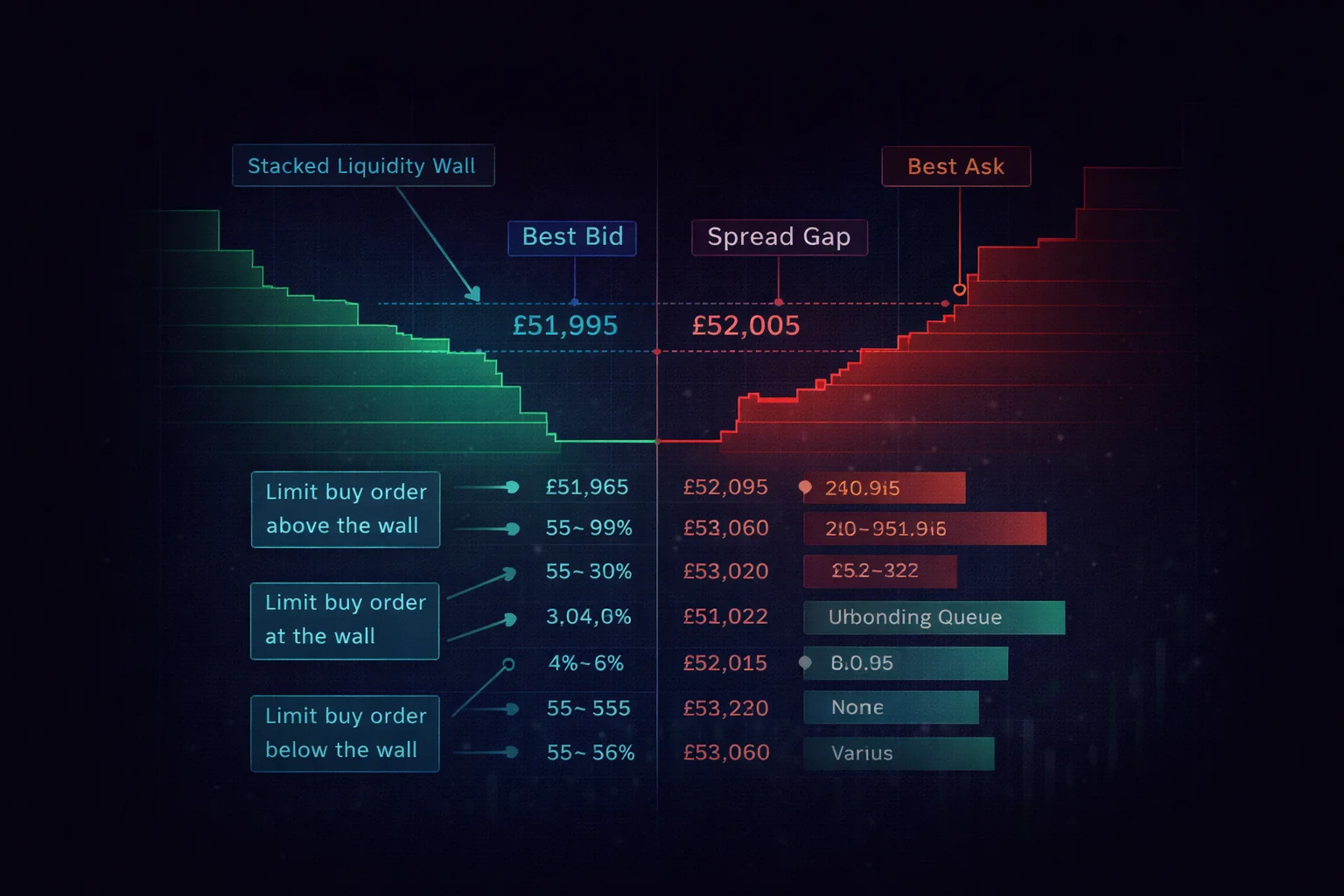
The order book is a live list of every open buy and sell order on a trading pair. The buy side (bids) shows what people are willing to pay; the sell side (asks) shows what people are asking. The gap between the highest bid and the lowest ask is the spread. On BTC/USDT on Binance during London business hours, that spread is typically £0.10-£0.30 — essentially nothing. On a thinly traded altcoin pair at 3am London time, the same spread can stretch to £5-£10.
Why does this matter for limit orders? Because the spread tells you where your order will sit in the queue and how quickly it will fill. If BTC's best bid is £52,001 and best ask is £52,002 and you place a limit buy at £52,001, you join the back of the bid queue — you fill only after every existing order at that price clears. If you place a limit buy at £52,001.50, you jump ahead of the entire queue, become the new best bid, and fill on the next sell order that hits the book. The 50p difference saves you minutes of waiting on a fast-moving pair.
You should also look at the order book depth, not just the top of book. Most exchanges show the next 20-50 levels with a cumulative volume column. For example, on Binance you might see £180,000 of bids stacked between £51,800 and £52,000 — that is a strong support cluster. If you are placing a limit buy of £500, setting it at £51,950 puts you above that wall and likely fills on any minor dip. Setting it at £51,750 puts you below the wall, where the price would need a real flush to reach you. Both are valid; the choice depends on whether you want speed or a discount.
One practical habit: before you place any limit order over £1,000, glance at the depth chart for 10 seconds. If you see thin liquidity above your price (sparse asks), the price can spike quickly through your limit and leave you behind. If you see thin liquidity below your price (sparse bids), a small market sell from someone else can push the price down and fill your buy at a discount. Reading the order book is the difference between placing orders blindly and placing them with intent.
Limit Order Fees and Settings
On Binance, your limit order pays the maker fee (0.10% base tier, 0.075% with BNB). On Kraken, the maker fee is 0.16% — a 38% saving compared to the 0.26% taker fee you would pay on a market order. On OKX, maker fees start at just 0.08%. Over a year of regular trading, the fee savings from consistently using limit orders instead of market orders can reach £50-200 depending on your volume. This is free money that requires no additional skill — just the habit of using the Limit tab instead of Market.
Scaled (ladder) orders are a useful refinement on the basic limit order. Instead of placing one £500 limit buy at a single price, you split it into five £100 orders at progressively lower prices: £52,000, £51,800, £51,600, £51,400, £51,200. If the price drifts down 1.5%, all five fill and your average is around £51,600. If it only dips to £51,800, you fill the top two and the rest stay open as resting bids. This approach captures more of any dip than a single-price limit and removes the need to guess the exact bottom. Most exchanges do not have a native ladder tool — you place the five orders manually, which takes about 90 seconds.
Partial fills are something every limit order user encounters. If you place a limit buy for 0.1 BTC at £51,950 and the best ask only has 0.04 BTC available at that price, your order fills 0.04 BTC immediately and the remaining 0.06 BTC stays open at £51,950. This is normal — there is nothing to do. The remaining order continues to work in the book and either fills later or you cancel it. Some exchanges show a "partially filled" status that confuses beginners into thinking something has gone wrong; it has not.
Key settings you should understand on your limit order:
- Good-Til-Cancelled (GTC) — your order stays open until you cancel it or it fills. This is the default on most exchanges and the setting you should use for DCA purchases and longer-term targets.
- Immediate-Or-Cancel (IOC) — your order fills as much as possible immediately, then cancels the rest. Useful for large orders where you want partial fills at your price but do not want the remainder sitting in the book.
- Fill-Or-Kill (FOK) — your entire order must fill immediately or it cancels completely. Rarely needed for retail trading.
- Post-Only — your order is guaranteed to be a maker order. If it would match immediately (acting as a taker), the exchange rejects it instead. This ensures you always pay the lower maker fee.
Stop-Limit Orders: Protect Your Position
A stop-limit order is a conditional order with two price points: a stop price (the trigger) and a limit price (the execution price). When the market reaches your stop price, the exchange automatically creates a limit order at your limit price. This is your safety net — it protects your position from catastrophic losses without requiring you to watch the market 24/7.
Stop-Limit in Practice
Here is how it works in practice. You bought 0.5 ETH at £2,800 (£1,400 total investment). You are willing to accept a 10% loss but not more. You place a stop-limit sell order with a stop price of £2,520 (10% below your entry) and a limit price of £2,500 (slightly below the stop to ensure execution). If ETH drops to £2,520, the exchange triggers your limit sell at £2,500. Your maximum loss is capped at approximately £150 (10.7%) instead of potentially 30-50% if you were not watching when the crash happened.
Why are there two prices? The stop price is your trigger — it tells the exchange when to activate your order. The limit price is the minimum price you are willing to accept. You should always set your limit price slightly below your stop price (1-2% lower) to account for fast-moving markets. If the price crashes through your stop price and your limit is set too close, your order might not fill because the market has already moved below your limit price by the time the exchange processes it.
Should you use stop-losses on your long-term DCA holdings? Generally, no. Bitcoin regularly drops 20-30% during normal market cycles, and a stop-loss at -15% would sell your position during every correction — forcing you to buy back at a higher price later. Stop-limit orders are most valuable for active trades where you have a specific entry price and risk tolerance, not for long-term accumulation strategies. If you are DCA-ing into Bitcoin for retirement, you should not have a stop-loss on that position at all.
You can also use stop-limit orders for buying, not just selling. A stop-limit buy order triggers when the price rises above your stop price — useful for breakout trading strategies where you want to buy if BTC breaks above a key resistance level. For example, if BTC is trading at £50,000 and you believe a breakout above £52,000 will lead to a rally, you can set a stop-limit buy at stop £52,000, limit £52,500. Your order activates only if the breakout happens, keeping your capital free if it does not.
Stop Trigger Price Types
One detail beginners overlook: which price does the exchange use to decide whether your stop has been hit? Most exchanges offer three trigger options — last price, mark price, and index price. The last price is the most recent trade on that exchange. The mark price is a smoothed average designed to prevent manipulation. The index price aggregates the same pair across multiple exchanges. On spot trading, last price is the default and usually fine. On futures trading, mark price is the standard because it protects you from a thin-liquidity wick that briefly touches your stop on one exchange while the broader market is unaffected.
A real example of why this matters: in 2022 a single £40,000 sell order on a small pair on Binance briefly pushed BTC down 4% on that one venue while every other exchange held steady. Traders with stop-loss orders set against last price on Binance got triggered and sold at the bottom of the wick. Traders using mark price kept their positions intact because the smoothed reference price never dropped that far. If your exchange offers the choice on a position you care about, mark price is safer for stop orders set 5-10% from the current level.
Modifying and Cancelling Stop Orders
Stop-limit orders are not "set and forget" forever — they need maintenance as your position evolves. If BTC rises 20% from your entry, your original 10% stop is now 28% below the current price, which is too loose. You should manually move your stop up to lock in some of the gain: a new stop at "entry + 5%" turns the trade into a guaranteed small profit even if the price reverses. This manual trailing is what most traders do instead of using a built-in trailing stop, because it lets you choose the new level rather than tying it to a fixed percentage.
The cadence of these adjustments depends on how active you are. For a swing trade you check daily, moving the stop weekly is fine. For a position you watch hourly, you might tighten the stop after every 5% move. The key rule: only ever move the stop in the direction that protects more profit, never the direction that allows more loss. Moving a stop further from the price to "give the trade more room" is the emotional mistake covered later in this guide.
OCO Orders: Two Plans at Once
OCO stands for One-Cancels-the-Other. It combines a limit order and a stop-limit order on the same position. When one order executes, the other cancels automatically. This is the most sophisticated order type available on most retail exchanges, and it solves a common problem: you want to take profit if the price goes up, but also cut your losses if the price goes down — and you do not want to monitor your position constantly.
Here is a real scenario. You bought 0.01 BTC at £50,000 (£500 investment). You want to take profit at £60,000 (+20%) or cut your losses at £45,000 (-10%). You place an OCO order with a limit sell at £60,000 and a stop-limit sell at stop £45,000 / limit £44,500. Now you can close your laptop. If BTC rallies to £60,000, your limit sell executes and your stop cancels — you bank a £100 profit. If BTC drops to £45,000, your stop triggers and your limit sell executes — you limit your loss to approximately £55. Either way, your position is managed without any intervention from you.
When should you use OCO? Every time you hold an active trading position and have both a profit target and a risk limit. If you buy a token expecting a 15% gain with a 10% maximum loss tolerance, an OCO order automates both outcomes. This is particularly valuable for UK investors who cannot watch the market during working hours — the crypto market operates 24/7, and significant moves often happen outside London business hours.
OCO is available on Binance (Spot trading → OCO tab), OKX (Spot trading → Advanced orders), and Kraken (Advanced order options). The interface varies slightly between platforms, but the mechanics are identical. Some exchanges call it "bracket order" instead of OCO — the concept is the same. As of mid-2026, Coinbase Advanced still does not expose OCO on the spot interface; verify the current order-type matrix on each platform's support page, because exchanges occasionally add or rename advanced-order features. The absence of an automated risk-management bracket is one of the reasons active traders tend to migrate from Coinbase Advanced to Binance or OKX once their position sizes grow beyond casual buying.
One discipline OCO orders enforce naturally: a sensible risk-reward ratio. Before you place the order, you have to decide both your profit target and your stop level — and the gap between them tells you whether the trade is worth taking. A trade with a £100 upside and a £100 downside is a 1:1 ratio: you need to be right more than half the time to break even after fees. A trade with £200 upside and £100 downside is 2:1: you can be right only one-third of the time and still come out ahead. Professional traders rarely take spot positions below 2:1, and many will not enter below 3:1. If you cannot construct an OCO with at least a 2:1 reward-to-risk ratio on a trade, the honest answer is usually that the trade does not deserve your capital — sit on your hands and wait for a better setup.
Position sizing flows from the same arithmetic. If your stop is 8% below your entry and you are willing to risk 1% of your portfolio on the trade, your position size is roughly 12% of your portfolio (1% ÷ 8% = 12.5%). On a £10,000 portfolio that means a £1,250 trade with the OCO stop set so the maximum loss is £100. This back-of-envelope calculation prevents the most common beginner pattern: putting half the portfolio into one trade with a tight stop, then watching a normal 5% wick liquidate it. OCO orders make this calculation visible because you have to type both prices in before the platform accepts the order.
Trailing Stop Orders: Ride the Trend
A trailing stop order follows the price as it moves in your favour, then triggers a sell if the price reverses by a specified amount or percentage. Unlike a fixed stop-loss that stays at one price, this order type "trails" behind the rising price — capturing more profit the further the price goes up, while still protecting you from a reversal.
Here is how it works. You bought BTC at £50,000 and set a trailing stop at 5%. When you create the order, your initial stop price is £47,500 (5% below £50,000). If BTC rises to £55,000, the stop level automatically adjusts to £52,250 (5% below the new high). If BTC continues to £60,000, your stop adjusts to £57,000. If the price then reverses and drops 5% from the £60,000 peak, the sell triggers at £57,000 — you sell with a £7,000 profit (14%) even though the price has started falling. Without this protection, you might have watched the price rise to £60,000 and then fall back to £48,000 while hesitating to sell.
When should you use a trailing stop? When you believe the price will continue rising but you want automatic protection if the trend reverses. This is ideal for momentum trades where you ride an uptrend without a fixed profit target. You should not use this order type on long-term DCA holdings — the 5-10% retracements that are normal in crypto would trigger sells constantly, forcing unnecessary sells and taxable events.
How do you choose the trailing percentage? For Bitcoin, a 5-8% distance works well for swing trades (holding 1-4 weeks). For more volatile altcoins, you may need 10-15% to avoid being stopped out by normal volatility. Too tight (2-3%) and you will get stopped out constantly on minor fluctuations. Too wide (20%+) and you lose its protective value. You should test your chosen percentage against the asset's average daily volatility — if BTC typically moves 3-5% in a day, a 3% distance will trigger on noise, not on a genuine reversal.
A more rigorous approach uses the Average True Range (ATR) of the asset over the past 14 days, which most charting tools display as a single number. Multiplying the 14-day ATR by 1.5 to 2 gives a trail distance that adapts to current volatility rather than relying on a fixed guess. For BTC during a calm range-bound week, the 14-day ATR might be £900, suggesting a trail of £1,350-£1,800. During a volatile week the same calculation might yield £2,500-£3,500. Using ATR keeps your trail proportionate to what the market is actually doing instead of forcing you to remember whether the last week was quiet or wild.
Trailing stops are available on Binance (Spot trading → Trailing Stop), OKX (Spot → Advanced), and most other major exchanges. On some platforms, you can set the trailing amount as a fixed price (e.g., £500) rather than a percentage — useful if you want your stop distance to remain constant regardless of the price level.
A note for DeFi users: if you provide liquidity to a decentralised exchange pool and worry about impermanent loss, a trailing sell mechanism on your underlying token positions on a centralised exchange can hedge some of that risk. For example, if you provide ETH/USDT liquidity and want to protect against a sharp ETH price decline, a trailing sell on your separate ETH spot position limits your overall portfolio exposure. Understanding tokenomics and APY yield calculations for your liquidity positions helps you determine appropriate trail levels for your hedge.
Which Order When: Your Decision Guide
Choosing the right order type depends on your situation. Here is a practical decision guide based on what you are trying to accomplish:
- Weekly DCA purchase — use a limit order at the current bid price or 0.1% below. Your order fills as a maker (lower fee) within minutes. If you use Binance Auto-Invest or OKX Recurring Buy, the platform handles this automatically via the Convert feature.
- Buying a dip — use a limit buy at your target entry price. Set it GTC (Good-Til-Cancelled) and check back daily. If the dip reaches your price, you buy automatically.
- Emergency exit — use a market order. When speed matters (flash crash, exchange security incident, breaking regulatory news), a market order gets you out immediately.
- Protecting a trade — use a stop-limit sell order at your maximum acceptable loss level. Set the limit 1-2% below your stop price to ensure execution.
- Take profit + stop loss — use an OCO order to set both your profit target and risk limit simultaneously.
- Riding an uptrend — use a trailing stop to capture profits automatically if the trend reverses.
For most beginners running a DCA strategy, you will use limit orders for 95% of your trades and market orders for the rare emergency exit. Stop-limit, OCO, and trailing stop orders become relevant when you start actively trading beyond simple accumulation. You should master limit orders first — they are the foundation of fee-efficient trading — before exploring the more advanced order types.
One important consideration: every order type works the same way whether you are trading spot (buying the actual cryptocurrency token into your exchange custody wallet) or trading futures (speculating on price movements with leverage using smart contract-based perpetual contracts). However, the consequences of choosing the wrong order type are amplified on futures because leverage magnifies both gains and losses. If you are new to trading, stay on the spot market until you are completely comfortable with all order types in this guide.
What about gas fee costs on decentralised exchanges? On a centralised exchange like Binance or OKX, you do not pay blockchain gas fees for placing orders — the exchange handles all matching internally. You only pay gas fees when you withdraw cryptocurrency to your own private key wallet or interact with DeFi protocols. This is one of the key advantages of centralised exchanges for active traders: your order execution is instant and gas-free, with the only cost being the maker or taker fee. If you later move your holdings to self-custody for long-term security, our hardware wallet security guide covers the process.
Order Types in Volatile Markets
The order types described above behave predictably during normal trading conditions. During flash crashes, exchange outages, weekend liquidity gaps, and major news events, their behaviour changes — sometimes in ways that catch beginners off guard. Understanding what happens in these moments is the difference between managing risk and being managed by it.
Flash Crashes and Stop Orders
A flash crash is a sudden, extreme price drop that lasts seconds to minutes before partially recovering. The May 2021 BTC flash crash on Binance saw the price drop from £36,000 to £30,000 in under 15 minutes. What happens to your stop-limit order in that environment? Your stop trigger fires, but your limit price might be skipped entirely as the price gaps through it. For example, a stop-limit sell at stop £35,000 / limit £34,800 in that crash would have triggered the limit order at £34,800 — but the next available bid was £33,500. Your order sits unfilled while the price continues falling, then either fills late on the recovery or remains open until you cancel it.
The defence against this is a wider gap between stop and limit, or using a "stop-market" order if your exchange offers it. A stop-market triggers a market sell when the stop price hits, accepting whatever price is available. You give up price control but gain certainty of execution. Binance offers stop-market on their futures platform but only stop-limit on spot. OKX offers both on spot. If you trade on Binance spot and want flash-crash protection, set your stop limit 3-5% below your stop price (not 1-2%) so the order can fill through a sudden drop.
Weekend and Off-Hours Liquidity
Crypto markets run 24/7, but liquidity is not constant. Saturday and Sunday volume on most pairs is 30-50% lower than weekday volume. London overnight (midnight to 6am) sees thinner books on GBP pairs because European market makers are offline. What does this mean for your orders? A limit order placed on a Saturday morning fills slower because there are fewer counterparties. A market order placed on a Sunday at 4am London time experiences 2-3x the slippage you would see at noon on Wednesday. If you can choose when to trade, weekday afternoons (when both London and New York are active) give you the tightest spreads and deepest books on every major pair.
This timing matters most for large orders. If you are buying £50 of BTC for your weekly DCA, the time of day is irrelevant — your order is too small to notice the spread. If you are buying £5,000, placing it on a Wednesday at 2pm London time instead of Sunday at 4am can save you £10-30 in slippage on Binance and significantly more on smaller exchanges. The crypto market never sleeps, but the people providing tight quotes do.
Exchange Outages During Big Moves
Exchanges go offline during the worst possible moments. When BTC moves 8% in an hour, Binance, Coinbase, and Kraken have all experienced login failures, order placement errors, or full outages at various points in the past five years. Your standing limit and stop orders continue to be processed by the exchange engine even when the website is down — but you cannot place new orders or cancel existing ones. The lesson: every active position should have its risk management orders set in advance, not dependent on you logging in to react. If you set your OCO when you open the position, an outage during a price move costs you nothing extra. If you planned to "watch the price and decide", an outage costs you the trade.
This is also why hardware wallet self-custody matters for long-term holdings (covered in our security guides). When an exchange has technical problems, your spot balance is fine — but you cannot move it. Funds you do not need to trade actively belong off the exchange, so an outage on trading day is annoying rather than catastrophic.
Common Order Type Mistakes
Using Market Orders for Routine Purchases
The most common and most expensive mistake: clicking "Market Buy" for your weekly DCA instead of using a limit order. On Kraken, this costs you an extra 0.10% per trade (0.26% taker vs 0.16% maker). On a £200/month DCA with 12 trades per year, that is £2.40/year in unnecessary fees — small, but free money you are leaving on the table. On Binance and OKX the fee difference is smaller (0-0.02%), but using limit orders still gives you a better execution price during volatile periods because you control the exact price you pay.
Setting Stop-Losses Too Tight
Bitcoin routinely drops 5-10% in a single day during normal market conditions. If you set your stop-loss at 5% below your entry price, you will get stopped out during nearly every correction — selling at a loss and then watching the price recover. You should set your stop-loss at a level that reflects genuine market risk, not normal volatility. For BTC, a 10-15% stop-loss gives your position room to breathe through typical fluctuations while still protecting you from major crashes.
Forgetting Open Orders
If you place a limit buy at £40,000 BTC when the price is £52,000, expecting a dip that never comes, that order stays open indefinitely (on GTC setting). Three months later, if BTC crashes to £40,000 during an unexpected event, your forgotten order fills — and you now own BTC at £40,000 that might continue dropping to £30,000. You should review your open orders weekly and cancel any that no longer match your current strategy. On Binance, check Orders → Open Orders. On OKX, check Trade → Orders → Active.
Ignoring Order Book Liquidity
Before placing a large order (over £2,000) on any trading pair, you should check the order book depth. If there is only £500 of liquidity at the current best price, your £2,000 market order will experience significant slippage as it fills across multiple price levels. On major pairs (BTC/USDT, ETH/USDT) on Binance, liquidity is deep enough that this is rarely a problem. But on smaller pairs (most GBP pairs, altcoin pairs with low volume), always use limit orders for larger trades to avoid paying the slippage premium.
Changing Orders Based on Emotion
You set a stop-loss at £45,000. Bitcoin drops to £46,000. Panic sets in — you lower your stop to £42,000, telling yourself "it will bounce." It does not. Now your loss is larger than your original risk tolerance. This is the most psychologically destructive mistake in trading. Your stop-loss represents a decision you made with a clear head before the trade. Moving it because you are afraid of taking the loss defeats its entire purpose. Set your order, walk away, and let the system work as designed.
Conclusion
The five order types on a crypto exchange each serve a distinct purpose in your trading toolkit. Market orders give you immediate execution when speed is critical — use them for emergency exits, not routine purchases. Limit orders give you price control and lower maker fees — use them for your DCA purchases, dip buying, and take-profit targets. Stop-limit orders protect your active trades from catastrophic losses — set them at 10-15% below your entry for BTC positions. OCO orders manage both your upside and downside automatically — use them for active trades where you have specific profit and loss targets. Trailing stops capture profits in trending markets — use them for momentum trades with a 5-8% trailing distance on Bitcoin.
For most beginners, the practical takeaway is simple: switch from market orders to limit orders for every routine purchase. This single change saves you money on fees, gives you a better average execution price, and teaches you the fundamental skill of reading the order book. Once you are comfortable with limit orders, add stop-limit orders to protect your active positions. OCO and trailing stops are valuable tools, but they are only necessary once you move beyond simple DCA accumulation into active trading.
The deeper lesson behind every order type in this guide is the same: control over your execution price compounds over time. A trader who consistently chooses the right order for the situation pays less in fees, suffers less slippage during volatility, and avoids the catastrophic mistakes that wipe out beginners during their first real bear market correction. None of this requires special talent or insider knowledge — only the discipline to pick the right tool for the job and the patience to let your orders work without constantly second-guessing them.
Your next step depends on where you are in your exchange journey. If you have not yet set up your DCA automation, read our DCA strategy setup guide. If you want to understand the exact fees you pay on each order type, see our exchange fees guide. For the complete beginner roadmap, return to our first 30 days on a crypto exchange hub.
Sources and References
Frequently Asked Questions
- What is the difference between a market order and a limit order?
- A market order executes immediately at the best available price — you get speed but not price control. A limit order only executes at your specified price or better — you get price control but no guarantee of execution. For your routine DCA purchases, limit orders save you money because you pay the lower maker fee. For emergency exits during a flash crash, market orders give you certainty of execution when every second counts.
- Should beginners use stop-loss orders?
- Yes, but not on your long-term DCA holdings. If you are actively trading (buying and selling within days or weeks), a stop-limit order at 10-15% below your entry price protects you from catastrophic losses. However, for long-term DCA investments that you plan to hold for years, stop-losses can trigger during normal crypto volatility (20-30% drawdowns are routine) and force you to sell at a loss during temporary dips that would have recovered.
- Do limit orders always get filled?
- No. A limit buy only fills if the market price drops to your limit price or lower. A limit sell only fills if the price rises to your limit or higher. If the price never reaches your limit, your order remains open until you cancel it or until it expires based on your time-in-force setting (GTC, IOC, or FOK). You should check your open orders weekly and cancel any that no longer match your current investment strategy.
- What is an OCO order and when should I use it?
- OCO (One-Cancels-the-Other) combines a limit sell and a stop-limit sell on the same position. When one executes, the other cancels automatically. You should use OCO whenever you hold an active trading position and have both a take-profit target and a maximum loss tolerance. It removes the need to monitor your position 24/7 — especially valuable since the crypto market never closes and significant moves happen outside UK business hours.
- Do I pay different fees for different order types?
- Yes. On most exchanges, limit orders that add liquidity to the order book pay the lower maker fee, while market orders pay the higher taker fee. On Binance, both start at 0.10%, but on Kraken the difference is 0.16% maker vs 0.26% taker — a 38% saving on every trade. Stop-limit and OCO orders pay maker or taker fees depending on how they execute. Your DCA purchases should always use limit orders to ensure you pay the lowest possible fee.
Back to Crypto Investing Blog Index
Financial Disclaimer
This content is not financial advice. All information provided is for educational purposes only. Cryptocurrency investments carry significant investment risk, and past performance does not guarantee future results. Always do your own research and consult a qualified financial advisor before making investment decisions.