How to Minimise Crypto Exchange Fees in 2026

Every fee type explained with real numbers, plus five proven tactics that save active traders hundreds of pounds per year.
Introduction
Fees are the silent tax on every crypto transaction. A 0.10% trading fee sounds negligible — until you realise that £5,000 in monthly spot trading volume costs you £60 per year in maker/taker fees alone. An active trader doing £50,000/month pays £600 in trading fees before touching a single withdrawal. Add blockchain network fees for withdrawals (£2-15 per transaction depending on whether you use Ethereum mainnet or a Layer 2 like Arbitrum), card deposit markups (1.5-3.5%), and the hidden spread embedded in Convert features, and the total cost of using a centralised exchange can reach 1-3% of your annual capital — money that comes directly out of your portfolio returns.
Most exchange marketing pages advertise headline rates like "0.10% fees" without mentioning that this applies only to spot trading on limit orders. If you use market orders, you pay the taker rate. If you deposit via debit card, you pay 1.8% on top. If you withdraw BTC on the mainnet instead of using the Lightning Network, you pay £5-25 per transaction. If you swap between altcoins using the Simple Convert feature instead of the order book, the exchange bakes a 0.1-0.5% spread into the exchange rate — invisible unless you compare the quoted rate against the mid-market price on a tool like CoinGecko or TradingView.
This guide breaks down every fee type you encounter on a crypto exchange, shows you exactly what Binance, OKX, Kraken, Bybit, and Coinbase charge for each, and gives you five concrete tactics to reduce your costs. You will learn how maker and taker fees work, why withdrawal network selection matters more than trading fee optimisation for most people, and how to stack referral discounts with native token payments for the lowest possible rate. The savings scale with your volume: a casual investor running a £200/month DCA strategy saves £30/year, while an active trader doing £20,000/month saves £180-300/year — enough to fund a hardware wallet or two months of additional DCA purchases.
If you are just getting started and want the full beginner roadmap before diving into fee structures, read our first 30 days on a crypto exchange guide first. Already comfortable with exchange basics? Read on — every section includes real pound-sterling examples so you can calculate your own fee exposure and identify which fees eat the largest share of your returns. Whether you are running a £200/month Bitcoin DCA or actively trading altcoins on the spot market, at least two of the five tactics below will reduce your costs immediately.
Types of Exchange Fees You Pay
Trading Fees (Maker and Taker)
Every time you buy or sell crypto on a spot exchange, you pay a trading fee calculated as a percentage of your trade value. The fee you pay depends on two factors: whether you are a maker or a taker, and your volume-based VIP tier. When you place a limit order that does not execute immediately — for example, a buy order below the current price — you are a maker because your order adds liquidity to the order book. When you place a market order that fills instantly, you are a taker because your order removes liquidity from the order book.
Understanding this distinction helps you choose the right order type for every trade. Which type should you use? In most cases, you should default to maker (limit) orders.
Exchanges reward makers with lower fees because they contribute to a healthy, liquid market. Here is what you actually pay at the base tier on each major exchange: Binance charges 0.10% for both maker and taker. OKX charges you 0.08% maker and 0.10% taker — an immediate 20% saving on limit orders compared to Binance. Kraken charges the most amongst low-fee exchanges: 0.16% maker and 0.26% taker — so you should always use limit orders on Kraken to save yourself the 38% taker premium. Coinbase charges the most: 0.40% maker and 0.60% taker on the standard interface, though you can reduce this to 0.05% maker and 0.08% taker by switching to Coinbase Advanced.
What does this mean for your wallet? If you are buying £500 of BTC and you are not in a rush, use a limit order set at the current bid price or slightly below. Your order sits in the order book and fills as a maker (lower fee) rather than a taker (higher fee). On Kraken, this single change saves you 0.10% per trade — £0.50 on a £500 trade, or £6 per year if you make one purchase per month. On Binance and OKX the difference is smaller (0-0.02%), but the habit of using limit orders still saves money over time and improves your execution price during periods of high volatility when the bid-ask spread widens.
Should you care about basis points at this level? That depends on your trading frequency. If you execute one trade per month, the difference between 0.08% and 0.10% on a £500 trade is 10p — irrelevant. But if you trade daily, rebalancing between BTC, ETH, and stablecoins, those basis points compound into £50-100/year. The key insight: trading fees are proportional to both your volume and your frequency. A high-volume DCA investor who buys once per week pays far less in total fees than a low-volume day trader who executes twenty trades per day.
Deposit Fees
Bank transfers via Faster Payments are free on Binance, OKX, and Kraken for UK users. This is the default deposit method and the one you should use for any planned purchase. Card deposits (Visa or Mastercard debit) are instant but carry a percentage fee: 1.8% on Binance, 1.5-3.5% on OKX (varies by provider), and 3.75% on Kraken. A £1,000 card deposit costs you £18-37.50 in fees — money you could have kept by waiting one business day for a free bank transfer. Is the instant access really worth paying £18 in unnecessary fees? For a planned purchase, the answer is almost never.
P2P (peer-to-peer) deposits charge you zero platform fee, but the seller sets their own price which typically includes a 1-3% markup above the mid-market rate. Should you use P2P for your deposits? Only if bank transfers are restricted or unavailable in your region. If you have Faster Payments access in the UK, P2P will almost always cost you more than a direct bank deposit. Apple Pay and Google Pay deposits are available on some exchanges but carry card-equivalent fees (1.5-2%) — you gain convenience but your total cost of investing increases significantly over time.
One hidden deposit cost that catches many UK users: if you deposit GBP and the exchange converts it to USDT automatically (some exchanges do this by default), the fiat-to-stablecoin conversion includes a spread of 0.1-0.3% that you never see as a separate fee line. You should check whether your deposit arrives as a GBP fiat balance or gets auto-converted to a stablecoin. On Binance, your GBP deposits stay as GBP unless you manually convert via the spot market or the Convert feature. On OKX, your experience depends on account settings — you must verify this before depositing large amounts.
How should you handle deposits if you are running a monthly DCA strategy? Set up a recurring Faster Payments standing order from your bank to your exchange GBP deposit address. This way, your capital arrives with zero deposit fees, ready for your scheduled buy. If your bank blocks the transfer (some UK banks still flag crypto exchange payments), try a different sending account or use the exchange's Open Banking integration if available. Never fall back to a card deposit for a planned, recurring purchase — the 1.8% card fee on a £500 monthly DCA costs you £108 per year for no benefit over a free bank transfer.
Withdrawal Fees
Withdrawal fees depend on the cryptocurrency and the blockchain network you choose — not the exchange itself (though exchanges add their own markup above the base network gas fee). If you send BTC on the Bitcoin mainnet, you pay approximately 0.0001-0.0005 BTC (£5-25 at current prices depending on mempool congestion). ETH on Ethereum mainnet costs you 0.001-0.005 ETH (£2-15). But the same USDT sent on TRC-20 (Tron network) costs you under £1, and on Arbitrum (an Ethereum Layer 2 rollup) under £0.20.
The choice of withdrawal network is the single biggest fee saving most people miss. If you are withdrawing USDT to your personal wallet or another exchange, you should use TRC-20 or Arbitrum — both are 10-50x cheaper than ERC-20 (Ethereum mainnet). For BTC, the Lightning Network offers near-instant transfers for under £0.10 — though your receiving wallet must support Lightning channels. Always check the network options dropdown before confirming a withdrawal — the default network is often the most expensive, and you cannot reverse an on-chain transaction once confirmed.
For UK users who withdraw to a hardware wallet for self-custody — where you control your own private key rather than trusting the exchange — withdrawal fees are a recurring cost worth minimising. If you withdraw monthly, the difference between using Ethereum mainnet (£10/withdrawal) and Arbitrum (£0.20/withdrawal) is £117.60 per year. That is a Ledger Nano S Plus paid for entirely by fee savings. You can learn more about securing your assets off-exchange in our hardware wallet security guide.
What about GBP fiat withdrawals back to your bank account? You need to sell your crypto for GBP on the spot market first, then withdraw the GBP balance to your UK bank via Faster Payments. Binance processes your GBP withdrawal for free, Kraken charges £1.95, and OKX lets you withdraw for free. Your money typically arrives within 30 minutes during business hours. If you are withdrawing a large amount (over £10,000), you should consider splitting into two transactions to reduce the risk of your bank placing a compliance hold on the entire amount.
Hidden Costs Most Guides Miss
Spread. The difference between the buy price (ask) and the sell price (bid) on any trading pair. On highly liquid pairs like BTC/USDT on Binance, you pay a negligible spread (0.01%). On less liquid pairs or smaller exchanges, your effective spread can be 0.5-2% — a hidden fee that does not appear on your trade confirmation. You should always check the order book depth before placing a large order: if the bid-ask spread is wider than 0.1%, consider splitting your trade into smaller chunks or using a limit order to avoid paying the full spread.
Convert feature markup. The Convert or Swap feature on Binance and OKX is simpler than the Spot trading page, but it embeds a 0.1-0.5% markup in the exchange rate that you never see as a line item. For a £50 purchase, the difference is 5-25p — irrelevant. For a £5,000 conversion, you lose £5-25 compared to placing the same trade on the Spot page. How can you check? Compare the Convert rate against the current mid-market price on CoinGecko — if the difference exceeds 0.1%, use the Spot trading page instead.
Inactivity fees. Some exchanges charge a monthly fee on dormant accounts. You will not pay inactivity fees on Binance, OKX, or Coinbase as of 2026. But smaller exchanges and certain legacy platforms (particularly those with traditional brokerage roots) may deduct £5-25/month from accounts with no activity for 6-12 months. You should check the terms of service before you stop using any exchange — if inactivity fees apply, withdraw your remaining balance to your own wallet rather than letting it erode to zero.
Crypto-to-crypto swap fees. Swapping BTC for ETH is a trade, not a transfer — you pay the standard trading fee (0.08-0.10% on Binance/OKX) on the swap value. It is also a taxable disposal event under HMRC rules — treated identically to selling BTC for GBP and then buying ETH. Every swap creates a Capital Gains Tax obligation based on the GBP value at the time of the swap. If you frequently rebalance your portfolio between assets, you should track every swap for both fee and tax purposes — the cumulative impact can be significant.
Slippage on large orders. Have you ever placed a market order and noticed the fill price was worse than expected? That is slippage — your order eats through multiple price levels in the order book because there is not enough liquidity at the quoted price. On BTC/USDT or ETH/USDT on Binance, you can execute £50,000+ with negligible slippage because the order book depth is massive. But on a smaller pair like AVAX/GBP on Kraken, a £5,000 market order may experience 0.2-0.5% slippage — costing you £10-25 more than you expected. You should use limit orders for any trade above £1,000, or split large orders into smaller chunks executed over several minutes to minimise price impact.
In summary, the fees you should watch for on any exchange include:
- Trading fees — 0.08-0.60% per trade depending on exchange and order type
- Deposit fees — free via bank transfer, 1.5-3.75% via card
- Withdrawal fees — £0.10-25 depending on blockchain network
- Spread — 0.01-2% hidden in the bid-ask gap or Convert rate
- Funding rates — up to 2.7%/month on perpetual futures positions
- Inactivity fees — £5-25/month on some smaller exchanges
Funding rates on leveraged positions. If you use perpetual futures or margin trading on smart contract-based platforms or centralised exchanges (covered in our order types guide), you pay a funding rate every 8 hours on perpetual futures contracts. This rate fluctuates between -0.01% and +0.03% per 8-hour period depending on market sentiment. During bullish periods, if you hold a long position, you must pay short holders — effectively a 0.03% fee three times per day, or 0.09%/day on your position. Over a month, that adds 2.7% to your costs — far more than any spot trading fee you will ever pay. If you trade futures, you should monitor your cumulative funding costs closely because they can erode your profits faster than any other fee type.
GBP-to-stablecoin conversion losses. One of the least visible costs for UK users specifically: if your exchange does not list a direct GBP/BTC pair with deep liquidity, you end up converting GBP to USDT first and then USDT to BTC. Each leg has its own spread and fee, and the cumulative slippage on a £1,000 deposit can reach 0.3-0.6% even on a major exchange.
On Binance, the GBP/USDT pair is reasonable but not as deep as USD/USDT, so the effective spread on the first leg is wider than you would pay in dollars. The fix is to use exchanges that offer direct GBP/BTC and GBP/ETH spot pairs with real order book depth (Kraken historically offered the best GBP liquidity, followed by Bitstamp), or to simply accept the conversion cost as a fixed friction of trading from a non-USD currency.
For monthly DCA amounts under £200 the cost is small enough to ignore in the context of your overall returns. For lump-sum deposits of £5,000 or more it is genuinely worth choosing the exchange with the deepest GBP order book on the relevant trading pair you intend to use, rather than picking the venue based purely on whichever exchange happens to advertise the cheapest headline maker fee on its official rate schedule landing page primarily aimed at new sign-ups.
Five Ways to Minimise Trading Fees
1. Use Native Exchange Tokens for Fee Discounts
Binance offers you a 25% discount on spot trading fees when you pay fees in BNB (Binance Coin). To activate this: first, buy a small amount of BNB (£5-10 is enough for months of fee payments). Then go to Settings → Fee Payment and enable "Pay trading fees with BNB." Your effective rate drops from 0.10% to 0.075%. On a £10,000 annual trading volume, this saves you £2.50 per year — modest but free. On £100,000 annual volume, your saving is £25.
OKX offers a similar 25% discount when holding OKB tokens and paying fees with them. Your discount structure on OKX is comparable to Binance. Kraken and Coinbase do not offer native token fee discounts — you pay the full published rate regardless of what tokens you hold in your account. If you trade primarily on one exchange, holding £5-10 of that exchange's native token is a no-brainer — the discount pays for itself on your first trade.
Can you lose money on the native token itself? Yes — BNB and OKB are volatile crypto assets with their own tokenomics and governance risks. But you only need a tiny balance (£5-10) to cover months of fee payments, so your price risk is minimal compared to the guaranteed savings you get on every trade.
One detail worth knowing about how the discount actually applies: BNB is consumed automatically each trade at the BNB-to-fee-currency conversion rate at the moment of execution, which means a fast-moving BNB price introduces small fluctuations into your effective rate. In practice the variance is invisible at retail volumes — you set it once and never look at it again for years on end. The mechanic only matters if you are paying tens of thousands of pounds in fees per month and trying to optimise down to the basis point of expected execution cost. For everyone else, the simple summary holds: enable the discount in your account settings, hold a small BNB or OKB balance equivalent to around 30 days of expected fees, and treat it as a permanent 20-25% reduction on your trading costs that costs effectively nothing to maintain after the initial five-minute setup process is complete.
2. Use Limit Orders (Be the Maker)
Maker fees are lower than taker fees on every major exchange — this is the simplest way to reduce what you pay per trade. Your saving is most pronounced on Kraken (0.16% maker vs 0.26% taker — a 38% reduction) and OKX (0.08% maker vs 0.10% taker — a 20% reduction). On Binance, both start at 0.10%, so you benefit less until you reach higher VIP tiers where the maker/taker gap widens.
How should you apply this in practice? Instead of clicking "Market Buy" for your weekly DCA purchase, go to the Limit tab, enter a price equal to the current bid price or 0.1% below it, and submit. Your order will likely fill within minutes (sometimes seconds) at the maker rate. If the price moves away from you, cancel and adjust. The extra 30 seconds of effort per trade saves you money on every single transaction for the rest of your trading life. Build this habit early — once you are comfortable with limit orders, you will never go back to market orders for routine purchases.
There is one situation where you should use market orders instead: when price is moving fast and you need to execute immediately (for example, exiting a position during a flash crash). In those moments, paying the taker fee is worth it because the price difference from waiting may exceed the fee you save. For everything else — your routine DCA buys, planned portfolio rebalancing, taking profits at a target price — limit orders are the better choice for your wallet.
3. Increase Your VIP Tier Through Volume
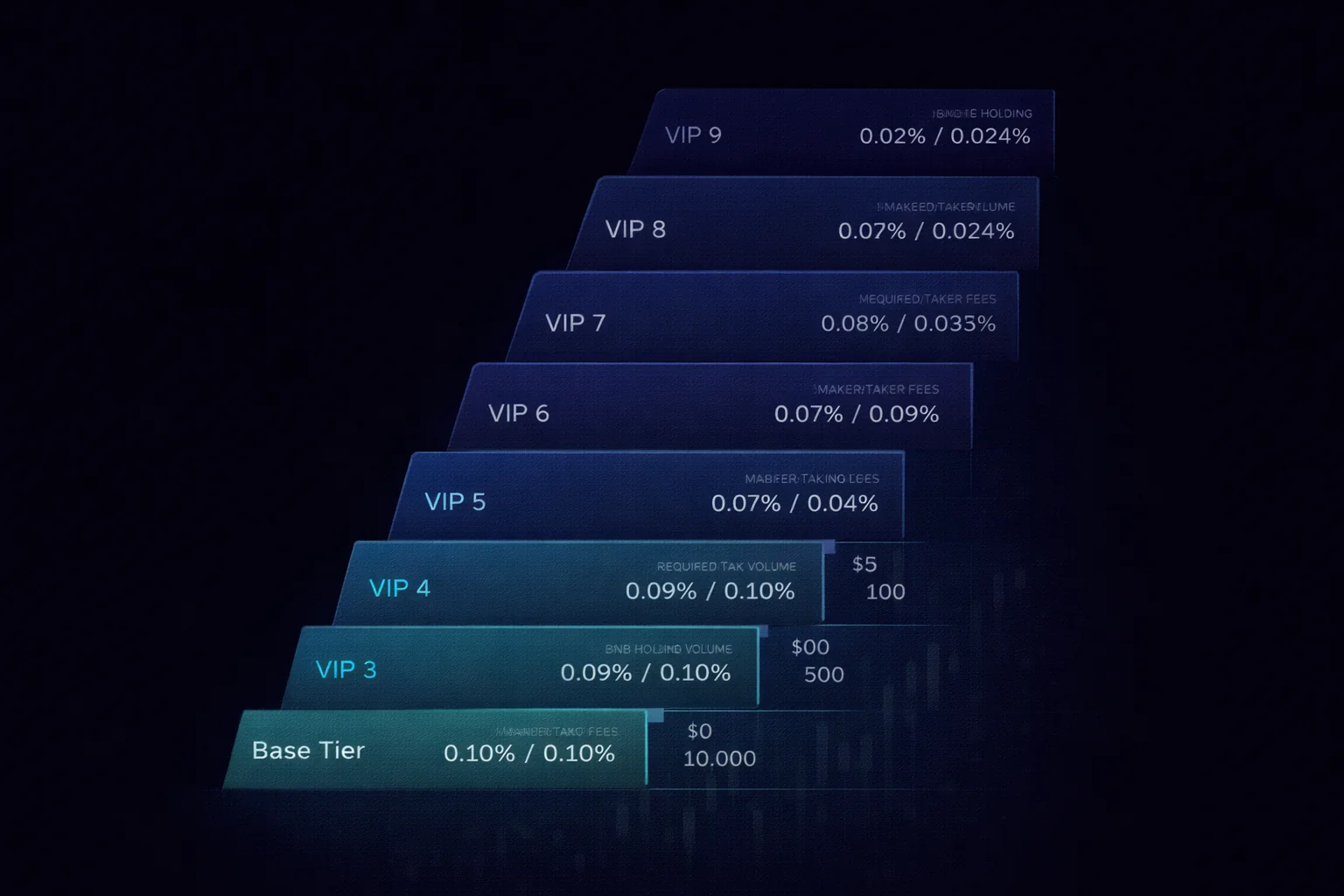
Every major exchange offers volume-based fee tiers that automatically reduce your rates as you trade more. Binance's VIP 1 (requiring $1M+ in 30-day volume or 25+ BNB balance) drops your maker/taker to 0.09%/0.10%. VIP 3 reaches 0.06%/0.08%. OKX's tiers start at VIP 1 ($5M+ 30-day volume) with 0.06% maker and 0.08% taker — but you need substantial volume to qualify.
The honest reality: VIP tiers are irrelevant for most beginners reading this guide. If your monthly volume is under £5,000, you sit at the base tier and the fee difference between tiers is under £1/month — not worth thinking about. Focus on tactics 1, 2, and 4 instead, which deliver immediate savings regardless of your volume. VIP tiers become meaningful if you trade £50,000+ per month, where a 0.02-0.04% tier reduction saves £10-20/month. If you reach that volume, the exchange will likely assign you a personal account manager who can negotiate custom rates below the published schedule.
One thing you should watch: some exchanges calculate your volume tier based on rolling 30-day spot volume only, while others include futures volume. If you trade both spot and perpetual futures, check whether your futures volume contributes to your VIP tier — on Binance and OKX, it does, which means you can reach higher spot fee tiers faster if you also trade derivatives.
Here is the full Binance VIP ladder as of early 2026 for context, even if most readers will never reach the higher tiers. Regular users sit at base tier with 0.10% maker / 0.10% taker. VIP 1 requires $1M in 30-day volume or 25 BNB held: 0.09% / 0.10%. VIP 3 requires $20M volume or 100 BNB: 0.06% / 0.08%. VIP 5 requires $120M volume or 500 BNB: 0.04% / 0.06%. VIP 9 (the top published tier) requires $4B volume and offers 0% maker / 0.024% taker.
The diminishing returns are visible in the numbers themselves: jumping from base to VIP 1 saves you 0.01-0.02 percentage points, jumping from VIP 5 to VIP 9 saves a similar amount. The honest takeaway is that for any retail investor below £100,000 of monthly volume the published tier ladder is academic — you will save more by enabling BNB fee payment than by trying to climb tiers.
OKX's VIP structure looks similar in shape but uses different volume thresholds for each rung of the ladder.
Kraken's Pro tiers start delivering meaningful discounts at lower volume levels (around $50,000/month), which is one of the reasons high-frequency UK traders sometimes choose Kraken Pro over Binance despite the higher base rate they pay on small trades.
If you do reach a volume that genuinely matters to your overall trading costs, the rational play is to email the exchange's institutional desk directly rather than relying on the public schedule. Both Binance and OKX offer custom rates below the published schedule for serious counterparties willing to commit volume, and the quoted starting point in those private conversations is usually negotiable on top of that.
None of this matters until you are well above £20,000/month in real trading volume. But it is worth knowing the ladder exists in case your activity grows over time.
4. Use Referral Discounts
Referral links provide you with permanent fee discounts or one-time bonuses that you cannot get through standard registration. Our Binance referral link gives you a 20% trading fee kickback — your effective fee drops from 0.10% to 0.08% permanently, matching OKX's base maker rate. The OKX referral gives you a mystery box bonus worth up to $10,000 when you complete registration.
These discounts stack with native token discounts. On Binance with both referral discount (20% off) and BNB fee payment (25% off), your effective maker fee drops to approximately 0.06% — the lowest rate available without qualifying for VIP tier volume requirements. Here is what that means in real numbers: on £10,000 annual trading volume, combined discounts save you approximately £4 compared to standard fees. On £50,000, the saving is £20. On £100,000, it is £40.
The discounts are permanent and free — they simply require registering through a referral link rather than the standard sign-up page. If you already registered without a referral code, check whether your exchange allows you to add one retroactively — most give you a 7-14 day window after account creation.
5. Choose the Cheapest Withdrawal Network
This is the highest-impact tactic for anyone who withdraws crypto to a personal wallet or transfers between exchanges — and it costs you nothing to implement. The same asset can be sent on different blockchain networks at wildly different costs. For USDT, your options typically include ERC-20 (Ethereum mainnet, £5-15), TRC-20 (Tron, under £1), BEP-20 (BNB Smart Chain, £0.10-0.30), and Arbitrum (Ethereum Layer 2, £0.10-0.20). You receive identical USDT regardless of which network you choose — the difference is purely in the transfer fee and confirmation speed.
Before every withdrawal, you must check which networks your receiving wallet supports. If you are sending to a hardware wallet via MetaMask on Arbitrum, verify that MetaMask is configured for the Arbitrum network and that the receiving address is correct for that network. Sending tokens on the wrong network to a wallet that does not support it can result in permanent, irrecoverable loss of your funds — no customer support team can reverse an on-chain blockchain transaction.
If you are unsure which network to choose, here is a quick reference for your most common withdrawal scenarios:
- USDT/USDC — use TRC-20 (under £1) or Arbitrum (under £0.20)
- BTC — use Lightning Network (under £0.10) if your wallet supports it, otherwise Bitcoin mainnet (£5-25)
- ETH — use Arbitrum or Optimism (£0.10-0.50) instead of Ethereum mainnet (£2-15)
- GBP fiat — use Faster Payments (free on Binance and OKX, £1.95 on Kraken)
Should you batch your withdrawals to save on fees? Yes, if you are withdrawing to long-term self-custody. Instead of withdrawing every trade result immediately, let your balance accumulate on the exchange for a week or a month, then withdraw in a single transaction. One monthly withdrawal at £0.20 (Arbitrum) costs you £2.40/year. Weekly withdrawals cost £10.40/year. The trade-off is custodial risk: your funds sit on the exchange longer, exposed to platform risk. For amounts under £1,000, monthly withdrawals strike a reasonable balance between fee savings and security. For amounts over £5,000, consider withdrawing more frequently — the fee cost is trivial compared to the risk of exchange insolvency.
Network fee dynamics also shift during market stress in ways the static numbers above do not capture. During a major Ethereum mainnet congestion event, ERC-20 USDT withdrawals can briefly spike from £8 to £40-60 as base gas prices triple under load from NFT mints, DeFi liquidations, or unusual on-chain activity. Layer 2 networks like Arbitrum and Optimism are not immune — they batch transactions back to mainnet for finality and the bridging costs flow through to end users in the form of higher withdrawal fees on the exchange side.
The practical defence is to avoid withdrawing during obvious congestion windows: if you see Ethereum gas prices above 80 gwei on a tracker like etherscan.io, wait 6-12 hours and try the withdrawal again at a calmer moment. The same withdrawal that costs £40 during a peak congestion event typically costs £8-12 once base demand normalises overnight or over a weekend when on-chain activity is naturally lower.
Annual Fee Calculator: What You Actually Pay
How much do you actually pay in fees over a full year? The percentages look small in isolation, but they compound across every trade, deposit, and withdrawal. Here are three realistic scenarios based on Binance base rates (0.10% maker/taker) with monthly Faster Payments deposits (free) and periodic withdrawals to a hardware wallet. Find the scenario closest to your trading profile and check whether fee optimisation is worth your time.
Casual investor — £200/month DCA, quarterly withdrawal. You make twelve monthly Bitcoin purchases at 0.10% = £2.40 in trading fees. You withdraw to your hardware wallet quarterly — four BTC mainnet withdrawals at £5 each = £20 in network fees. Your total annual cost: approximately £22.40. With BNB discount (0.075%): £21.60. The £0.80 saving from BNB is negligible at this volume — you should choose your exchange by features, security, and regulatory standing, not by fee optimisation. If you switch those withdrawals to Arbitrum (£0.20 each), your total drops to £3.20 — a £19 annual saving just from choosing a cheaper network.
Active investor — £2,000/month, monthly withdrawal. You make approximately twenty-four trades per year (two per month — a buy and an occasional rebalance between BTC and ETH) at 0.10% on £2,000 average = £48 in spot trading fees. You withdraw monthly to your self-custody wallet on Arbitrum at £0.20 per withdrawal = £2.40. Your total: approximately £50.40. With BNB discount + referral: £32. The £18.40 saving covers a year of automated DCA purchases or pays for a crypto tax tool subscription.
Serious trader — £20,000/month volume, weekly activity. You execute approximately 100 trades per year at 0.10% on varying sizes averaging £5,000 per trade = £500 in spot trading fees. Your withdrawal costs depend heavily on network choice: Ethereum mainnet = £120/year, Arbitrum = £10/year. Your total range: £510-620 without optimisation. With BNB fee payment + referral discount + Arbitrum withdrawals: £330-350. The five optimisation tactics in this guide save you £180-270/year — real money that compounds when reinvested into your portfolio. At this volume, you should also track your fees quarterly and claim them as allowable costs on your Self Assessment tax return.
What does this mean for you? If you are a casual investor, fees are a rounding error. But if you trade actively, fee optimisation is a genuine investment return. Where do you fall on this spectrum? If your monthly volume is under £1,000, you should spend five minutes enabling BNB fee payment and then forget about fees entirely. If your volume exceeds £5,000/month, you should implement all five tactics in this guide and review your fee expenditure quarterly.
Tracking Your Fees and Tax Implications
Every fee you pay on a centralised exchange is recorded in your trade history and can be exported as a CSV file. On Binance, go to Orders → Trade History → Export. On OKX, navigate to Assets → Order History → Export Records. Kraken provides a comprehensive ledger export under History → Export. You should download these records at least quarterly — exchanges occasionally change their export format or limit historical data access to 12-18 months, and you need complete records for your annual tax return.
Why does fee tracking matter for your UK tax return? Under HMRC rules, trading fees are an allowable cost that directly reduces your Capital Gains Tax liability. Here is how it works: when you buy £1,000 of BTC and pay a £1 trading fee, your cost basis becomes £1,001. When you sell for £2,000 and pay another £1 fee, your disposal proceeds are £1,999. Your taxable gain is £998, not £1,000. For an active trader paying £200-500/year in total fees, you can reduce your CGT bill by £40-100 (at 20% CGT rate) simply by including these costs in your Self Assessment calculations. You are legally entitled to deduct them — do not leave money on the table.
Portfolio tracking tools like Koinly, CoinTracker, and CryptoTaxCalculator can automatically import your exchange data via API key or CSV upload and calculate your capital gains with fees included as allowable costs. If you trade on multiple centralised exchanges and also use DeFi protocols (decentralised exchanges, yield farming, liquid staking), these tools handle the complexity of matching buys and sells across platforms using HMRC's share pooling rules and Section 104 holding calculations. The subscription cost (£49-99/year for most UK users) is usually justified if you make more than 20-30 trades per year, as the time you save on manual spreadsheet calculations exceeds your subscription cost.
One tax trap you should watch: if you transfer crypto between your own wallets (exchange to hardware wallet, or between exchanges), the transfer itself is not a taxable event — but the withdrawal fee is still an allowable cost you can deduct. You should record these transfers and their fees separately from your trades. If HMRC queries your records, you need to demonstrate that a transfer was a wallet-to-wallet movement, not a disposal.
What about income from exchange earn features? If you earn staking rewards (where your tokens help secure a proof-of-stake consensus network via a validator node), mining pool distributions, or lending interest through your exchange, your income is subject to Income Tax at the point you receive it — and the exchange may or may not withhold any tax.
The APY advertised on earn products does not account for the fees your exchange charges on reward distribution or the tax liability you incur. For example, if Binance offers 3.5% APY on ETH staking and charges a 25% commission on rewards, your net APY is approximately 2.6% before tax. You should track these earnings separately from your trading activity — they create a different type of tax obligation under HMRC's cryptoasset guidance.
Your Fee Minimisation Action Plan
Ready to start saving? Here is exactly what you should do, in order, based on your experience level. Each step takes under five minutes and the savings begin on your next trade. The five tactics ranked by annual saving potential:
- Choose the cheapest withdrawal network — saves you £10-100+/year
- Use limit orders instead of market orders — saves you 0-0.10% per trade
- Enable native token fee payment (BNB/OKB) — saves you 25% on trading fees
- Register through a referral link — permanent 20% fee discount
- Track and deduct your fees on your tax return — saves you £20-100/year in CGT
If You Are Just Getting Started
First, register on your chosen exchange through a referral link to lock in a permanent fee discount — you cannot add this retroactively after 14 days. Next, fund your account via Faster Payments bank transfer (never use a debit card for planned deposits). Then, buy a small amount of BNB or OKB (£5-10) and enable native token fee payment in your account settings. Finally, when you make your first purchase, use a limit order instead of a market order — set your price at the current bid and wait for it to fill. These four steps take 10 minutes total and reduce your effective trading fee from 0.10% to approximately 0.06% on Binance.
If You Already Trade Regularly
Check whether you registered with a referral code — if not, and your account is under 14 days old, you can still add one. Verify that native token fee payment is enabled (Settings → Fee Payment on Binance). Review your last 10 withdrawals: did you use the cheapest network available? If you have been using Ethereum mainnet for USDT transfers, switching to Arbitrum or TRC-20 could save you £5-10 per withdrawal. Export your trade history CSV and check your total fees paid in the last quarter — you may be surprised by the cumulative amount. Consider whether a portfolio tracking tool like Koinly would save you time on your Self Assessment tax return.
If You Trade £5,000+ Per Month
At your volume, you should implement all five tactics from this guide and review your fee expenditure monthly. Check your VIP tier status — if your 30-day volume (including futures) qualifies you for a higher tier, the fee reduction applies automatically. Consider whether consolidating your trading on a single exchange would push you into a better VIP tier rather than splitting volume across two or three platforms. Export your annual fee data and ensure your accountant or tax tool includes all trading fees, withdrawal fees, and transfer costs as allowable deductions. At £5,000+/month volume, proper fee tracking alone can save you £20-50/year in tax.
Conclusion
You now understand the four categories of exchange fees: trading fees (0.08-0.60% depending on the exchange and your VIP tier), deposit fees (free via Faster Payments bank transfer, 1.5-3.75% via debit card), withdrawal fees (£0.10-15 depending on the blockchain network you choose), and hidden costs (bid-ask spread, convert markup, slippage, funding rates, and swap tax events). Knowing all four categories helps you avoid overpaying on the ones you can control — and most of them are controllable.
Here are the five minimisation tactics in order of real-world impact for your situation: first, choose the cheapest withdrawal network (this saves you £10-100+/year if you transfer to a hardware wallet or between exchanges — the single highest-impact change you can make). Second, use limit orders instead of market orders on the spot trading page (saves you 0-0.10% per trade depending on the exchange, and improves your execution price during volatile markets).
Third, activate native token fee payment with BNB on Binance or OKB on OKX (saves you 25% on every trading fee for the cost of holding £5-10 in native tokens). Fourth, register through a referral link for permanent fee discounts that stack with your native token savings. Fifth, graduate to VIP tiers if your monthly volume exceeds £50,000 — irrelevant for beginners, but meaningful if you trade actively.
Your next step depends on where you are in your crypto journey. If you have not yet registered on an exchange, start with our first 30 days on a crypto exchange hub, which walks you through account setup, KYC verification, and your first trade. If you want to automate your purchases, read our DCA strategy setup guide. For the complete side-by-side fee comparison across Binance, OKX, Kraken, Bybit, and Coinbase — with cheapest-by-use-case recommendations — see our exchange fees comparison.
Sources and References
Frequently Asked Questions
- Which crypto exchange has the lowest fees?
- OKX has the lowest base maker fee at 0.08%. Binance matches at 0.075% with BNB discount enabled. Bybit offers 0.10% maker/taker at the base tier. For most beginners trading under £1,000/month, the fee difference between Binance, OKX, and Bybit is under £1/month — choose by features and trust, not fees alone. Coinbase and Kraken are significantly more expensive at the base tier but offer stronger regulatory standing in some jurisdictions.
- Are withdrawal fees the same on every exchange?
- No. Withdrawal fees vary by exchange and by network. Binance charges 0.0005 BTC for a Bitcoin mainnet withdrawal, while Kraken charges 0.00015 BTC — over 3x cheaper for the same transaction. For stablecoins, always compare the TRC-20 and Arbitrum network fees across exchanges. Some exchanges subsidise withdrawals on specific networks to encourage usage — check the withdrawal page for current fees before committing.
- What is the difference between maker and taker fees?
- A maker places a limit order that adds liquidity to the order book — it sits there waiting to be filled by another trader. A taker places a market order (or an aggressive limit order) that fills immediately by matching against existing orders. Exchanges charge makers less because they improve market quality. On Kraken, the difference is 0.16% (maker) vs 0.26% (taker) — switching to limit orders saves you 38% on every trade.
- Is Coinbase more expensive than Binance?
- On the standard Coinbase interface, significantly: 0.40-0.60% per trade vs Binance's 0.10%. Coinbase Advanced (previously Coinbase Pro) reduces this to 0.05-0.08% for high-volume traders, which is competitive with Binance VIP tiers. For a UK beginner doing £500/month in purchases, the annual fee difference between standard Coinbase (£36) and Binance (£6) is £30 — enough to matter but not enough to override other factors like regulatory preference or interface comfort.
- Do I pay fees on crypto-to-crypto swaps?
- Yes, both a trading fee and a tax event. The exchange charges the standard spot trading fee (0.08-0.10% on Binance/OKX) on the swap value. Additionally, HMRC treats every crypto-to-crypto swap as a disposal of the first asset — triggering Capital Gains Tax on any gain above your cost basis. If you bought BTC at £40,000 and swap it for ETH when BTC is at £60,000, you have a £20,000 taxable gain regardless of whether you ever converted to GBP. Track every swap for tax reporting.
Back to Crypto Investing Blog Index
Financial Disclaimer
This content is not financial advice. All information provided is for educational purposes only. Cryptocurrency investments carry significant investment risk, and past performance does not guarantee future results. Always do your own research and consult a qualified financial advisor before making investment decisions.